Understanding OpenClaw
What is OpenClaw? OpenClaw is an open-source, self-hosted AI Agent system that transforms AI from a “chat tool” into a “digital employee capable of autonomously executing tasks.”
Dimension
ChatGPT
OpenClaw
Positioning
Q&A Advisor
Digital Employee
Deployment
Cloud SaaS
Local Self-hosted
Interaction
Web Chat
20+ Chat Channels
Capability
Answer Questions
Execute Tasks
Data
Cloud Storage
Local Control
Core Capabilities
✅ Multi-channel Connection : Telegram, WhatsApp, Feishu, DingTalk, Discord, etc.
✅ Persistent Memory : Remembers your preferences, projects, contacts
✅ Skill Extension : Infinitely expand capabilities through the Skills system
✅ Proactive Work : Scheduled tasks, heartbeat checks, automatic reminders
✅ Local Data : All data stored on your device
✅ Multi-Agent Collaboration : Dedicated agents for different tasks
Architecture Overview 1 2 3 4 5 6 7 8 9 10 11 12 13 14 15 16 17 18 19 20 21 22 ┌─────────────────────────────────────────────────────────┐ │ User Chat Channels │ │ Telegram / WhatsApp / Feishu / DingTalk / Discord ... │ └────────────────────┬────────────────────────────────────┘ │ ▼ ┌─────────────────────────────────────────────────────────┐ │ Gateway Core Service │ │ - Message Routing - Session Management - Event Processing - Task Scheduling │ └────────────────────┬────────────────────────────────────┘ │ ▼ ┌─────────────────────────────────────────────────────────┐ │ Agent System │ │ main / chat / coding / Custom Agents │ └────────────────────┬────────────────────────────────────┘ │ ▼ ┌─────────────────────────────────────────────────────────┐ │ Tools & Skills │ │ Skills / Plugins / Tools / Memory / Cron │ └─────────────────────────────────────────────────────────┘
Quick Start
System Requirements
Requirement
Description
Node.js
v22.0.0 or higher
Operating System
macOS / Linux / Windows (WSL2)
Memory
Minimum 2GB, Recommended 4GB+
Storage
Minimum 1GB available space
One-Click Installation macOS / Linux:
1 curl -fsSL https://openclaw.bot/install.sh | bash
Windows (PowerShell):
1 iwr -useb https://openclaw.ai/install.ps1 | iex
Verify Installation 1 2 3 4 5 6 7 8 openclaw --version openclaw doctor openclaw status
5-Minute Quick Experience 1 2 3 4 5 6 7 8 9 10 11 12 13 npm i -g openclaw openclaw onboard openclaw gateway start openclaw dashboard
Installation & Deployment
Installation Methods Comparison
Method
Difficulty
Use Case
One-Click Script
⭐
Recommended for beginners
npm Manual Install
⭐⭐
Familiar with Node.js
Docker
⭐⭐
Containerized deployment
Source Build
⭐⭐⭐⭐
Developers
Manual Installation (npm) 1 2 3 4 5 6 7 8 node -v npm install -g openclaw@latest SHARP_IGNORE_GLOBAL_LIBVIPS=1 npm install -g openclaw@latest
If you get openclaw: command not found:
1 2 3 4 5 6 7 8 npm prefix -g export PATH="$(npm prefix -g) /bin:$PATH " source ~/.bashrc
Docker Deployment 1 2 3 4 5 docker run -d \ --name openclaw \ -v ~/openclaw-data:/root/.openclaw \ -p 18789:18789 \ openclaw/openclaw:latest
Version Updates 1 2 3 4 5 6 7 8 openclaw update --channel stable openclaw update --channel beta openclaw update --channel dev
Channel Integration
Channel Difficulty Comparison
Tier
Platform
Time
Description
First Tier
Telegram, QQ
5-10 min
Easiest, zero threshold
Second Tier
Discord, Feishu
15-20 min
Well-documented
Third Tier
WhatsApp, Slack, DingTalk
25-40 min
More configuration
Fourth Tier
iMessage, WeChat
1+ hour
Additional requirements
Telegram Integration (Recommended for Beginners) Step 1: Create Bot
Search for @BotFather in Telegram
Send /newbot command
Set bot name (must end with bot)
Save the returned Bot Token
Step 2: Configure OpenClaw
Edit ~/.openclaw/openclaw.json:
1 2 3 4 5 6 7 8 9 10 { "channels" : { "telegram" : { "enabled" : true , "botToken" : "YOUR_BOT_TOKEN" , "dmPolicy" : "pairing" , "allowFrom" : [ "tg:YOUR_USER_ID" ] } } }
Step 3: Start and Pair
1 2 3 4 5 openclaw gateway restart
Feishu Integration 1 2 openclaw configure --section feishu
You need to create an enterprise self-built app in the Feishu Open Platform and obtain App ID and App Secret.
Multi-Channel Configuration You can configure multiple channels simultaneously:
1 2 3 4 5 6 7 { "channels" : { "telegram" : { "enabled" : true , "botToken" : "..." } , "feishu" : { "enabled" : true , "appId" : "..." , "appSecret" : "..." } , "discord" : { "enabled" : true , "botToken" : "..." } } }
Configuration Guide
Configuration File Locations
File
Path
Description
Main Config
~/.openclaw/openclaw.jsonGateway, channels, models
Agent Config
~/.openclaw/agents/*/agent/Individual agent configs
Workspace
~/.openclaw/workspace-*/Agent workspaces
Model Configuration Edit ~/.openclaw/openclaw.json:
1 2 3 4 5 6 7 8 9 10 11 12 13 14 15 16 17 18 19 20 21 22 23 24 25 26 27 { "models" : { "mode" : "merge" , "providers" : { "bailian" : { "baseUrl" : "https://dashscope.aliyuncs.com/compatible-mode/v1" , "apiKey" : "sk-YOUR_API_KEY" , "api" : "openai-completions" , "models" : [ { "id" : "qwen3.5-plus" , "name" : "qwen3.5-plus" , "contextWindow" : 1000000 , "maxTokens" : 65536 } ] } } } , "agents" : { "defaults" : { "model" : { "primary" : "bailian/qwen3.5-plus" } } } }
Recommended Models
Provider
Model
Use Case
Alibaba Cloud
qwen3.5-plus
General tasks, cost-effective
Anthropic
Claude Opus 4.6
Programming, code generation
Zhipu
glm-5
Optimized for Chinese tasks
Moonshot AI
kimi-k2.5
Long text processing
5.4 Gateway Configuration 1 2 3 4 5 6 7 8 9 10 11 12 13 14 15 { "gateway" : { "port" : 18789 , "mode" : "local" , "bind" : "lan" , "auth" : { "mode" : "token" , "token" : "your-secure-token" } , "controlUi" : { "allowedOrigins" : [ "http://192.168.1.100:18789" ] , "allowInsecureAuth" : true } } }
Authentication Modes Token Authentication (Recommended for API Integration):
1 2 3 4 5 6 7 8 { "gateway" : { "auth" : { "mode" : "token" , "token" : "your-token" } } }
Password Authentication (Recommended for Web UI):
1 2 3 4 5 6 7 { "gateway" : { "auth" : { "mode" : "password" } } }
Multi-Agent Configuration
What is Multi-Agent? OpenClaw supports running multiple independent Agent instances, where each Agent can:
Use different model configurations
Have independent workspaces and memory
Focus on specific types of tasks
Configure Skills and tools independently
Built-in Agent Types
Agent
Purpose
Recommended Model
main Main conversation Agent, handles daily tasks
qwen3.5-plus
chat Pure chat Agent, casual conversation
qwen3.5-plus
coding Programming Agent, code generation/review
Claude Opus 4.6
analysis Data analysis Agent
qwen3.5-plus
Creating Custom Agents 1 2 3 4 5 6 7 8 9 10 11 openclaw agents create my-agent openclaw agents config my-agent --model glm-5 openclaw agents workspace my-agent --path ~/projects/my-agent openclaw agents start my-agent
Assign Agents to Different Tasks
Task Type
Recommended Agent
Invocation
Daily conversation, Q&A
main
Default
Writing code, Debugging
coding
/agent coding
Data analysis, Reports
analysis
/agent analysis
Creative writing
chat
/agent chat
Domain-specific tasks
Custom Agent
/agent <name>
Agent Routing Configuration Method 1: Command Prefix
1 2 /agent coding Help me write a Python script /agent analysis Analyze this data
Method 2: Automatic Routing (Keyword-based)
1 2 3 4 5 6 7 8 9 10 11 12 13 14 { "routing" : { "rules" : [ { "keywords" : [ "code" , "programming" , "python" , "javascript" ] , "agent" : "coding" } , { "keywords" : [ "analyze" , "data" , "chart" ] , "agent" : "analysis" } ] } }
Method 3: Channel Binding
1 2 3 4 5 6 7 8 9 10 { "channels" : { "telegram" : { "defaultAgent" : "main" } , "discord" : { "defaultAgent" : "chat" } } }
Multi-Agent Best Practices ✅ Recommended:
Create dedicated Agents for high-frequency tasks
Use separate Agents for programming (avoid context pollution)
Create independent Agent instances for different projects
Regularly clean up inactive Agents
❌ Avoid:
Creating too many Agents (recommended ≤5)
All Agents using the same model (wastes resources)
Ignoring memory isolation between Agents
View and Manage Agents 1 2 3 4 5 6 7 8 9 10 11 12 13 14 openclaw agents list openclaw agents status my-agent openclaw agents config my-agent --show openclaw agents stop my-agent openclaw agents delete my-agent
Multi-Agent Architecture Example 1 2 3 4 5 6 7 8 9 10 11 12 13 14 15 16 17 18 19 20 21 22 ┌─────────────────────────────────────────────────────────┐ │ User Message │ └────────────────────┬────────────────────────────────────┘ │ ▼ ┌─────────────────────────────────────────────────────────┐ │ Routing Layer (distributes by rules) │ │ Keyword Matching / Command Prefix / Channel Binding │ └──────────┬──────────────┬──────────────┬────────────────┘ │ │ │ ▼ ▼ ▼ ┌──────────┐ ┌──────────┐ ┌──────────┐ │ main │ │ coding │ │ analysis │ │ Agent │ │ Agent │ │ Agent │ └────┬─────┘ └────┬─────┘ └────┬─────┘ │ │ │ ▼ ▼ ▼ ┌──────────┐ ┌──────────┐ ┌──────────┐ │ General │ │ Code │ │ Data │ │ Memory │ │ Skills │ │ Tools │ │ Qwen3.5 │ │ Claude │ │ Pandas │ └──────────┘ └──────────┘ └──────────┘
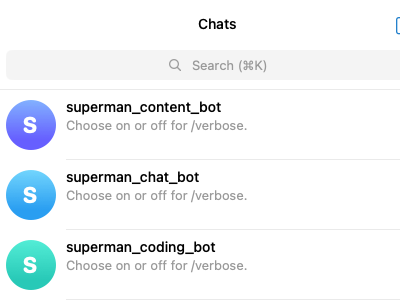
Here’re the Telegram Bot I’ve configured with diffent agent roles:
Skills System
What are Skills? Skills are OpenClaw’s plugin system, enabling AI to:
Access external APIs (weather, news, stocks)
Operate local resources (files, cameras)
Execute specific tasks (GitHub, calendar, email)
Installing Skills 1 2 3 4 5 6 7 8 9 10 11 openclaw skill install <skill-slug> openclaw skill search <keyword> openclaw skill list openclaw skill update
Popular Skills
Skill
Function
Install Command
weather
Weather forecast
openclaw skills install weather
github
GitHub operations
openclaw skills install github
news-aggregator News aggregation
npx skills add https://github.com/BODYsuperman/world-news-aggregator-skill
pinchtab-browser
Browser automation
openclaw skills install pinchtab-browser
Creating Custom Skills 1 2 3 4 5 6 7 8 9 10 11 12 13 mkdir -p ~/.openclaw/workspace-main/skills/my-skillcat > ~/.openclaw/workspace-main/skills/my-skill/SKILL.md << 'EOF' My custom skill /MyCommand [arguments] EOF
Memory System
Memory Types
Type
File
Description
Long-term Memory
MEMORY.mdCurated important information
Daily Memory
memory/YYYY-MM-DD.mdRaw logs
Identity
IDENTITY.mdAI personality settings
User
USER.mdUser information
Soul
SOUL.mdBehavioral guidelines
Memory File Locations 1 2 3 4 5 6 7 8 9 10 11 ~/.openclaw/workspace-main/ ├── MEMORY.md # Long-term memory ├── IDENTITY.md # Identity settings ├── USER.md # User information ├── SOUL.md # Behavioral guidelines ├── AGENTS.md # Workspace description ├── TOOLS.md # Tool notes ├── HEARTBEAT.md # Heartbeat tasks └── memory/ ├── 2026-03-16.md # Daily memory └── 2026-03-15.md
Search Memory 1 2 3 4 5 openclaw memory search "project mentioned last time" openclaw memory search --date 2026-03-15 "meeting"
Memory Maintenance Recommended to review MEMORY.md regularly (weekly):
Remove outdated information
Add new decisions and context
Organize highlights from daily memory files
Scheduled Tasks
Cron Basics 1 2 3 4 5 6 7 8 9 10 11 openclaw cron add --schedule "0 9 * * *" --message "Good morning! Today's tasks:" openclaw cron list openclaw cron run <job-id> openclaw cron remove <job-id>
Cron Expressions
Expression
Description
0 9 * * *Daily at 9:00
0 9 * * 1Every Monday at 9:00
*/30 * * * *Every 30 minutes
0 0 1 * *1st of each month at 0:00
Heartbeat Tasks Edit HEARTBEAT.md:
1 2 3 4 5 6 # HEARTBEAT.md - [ ] Check unread emails- [ ] View calendar (within 24 hours)- [ ] Check weather (if going out)- [ ] Review memory files (weekly)
Practical Cron Examples Daily News Briefing:
1 2 3 4 openclaw cron add \ --name "daily-news" \ --schedule "0 8 * * *" \ --message "Execute news-aggregator skill, send daily news"
Weekly Backup:
1 2 3 4 openclaw cron add \ --name "weekly-backup" \ --schedule "0 2 * * 0" \ --message "Backup workspace and memory directories"
Common Commands
Gateway Management 1 2 3 4 5 6 openclaw gateway start openclaw gateway stop openclaw gateway restart openclaw gateway status openclaw gateway install openclaw gateway uninstall
Configuration Management 1 2 3 4 5 6 openclaw onboard openclaw configure openclaw doctor openclaw status openclaw dashboard openclaw tui
Model Management 1 2 3 openclaw models status openclaw models list openclaw models add
Channel Management 1 2 3 openclaw channels list openclaw channels add openclaw channels remove
Agent Management 1 2 3 4 5 6 openclaw agents list openclaw agents create <name> openclaw agents config <name> openclaw agents start <name> openclaw agents stop <name> openclaw agents delete <name>
Memory Operations 1 2 3 openclaw memory search <query> openclaw memory list openclaw memory edit
Session Management 1 2 3 openclaw sessions list openclaw sessions history <key> openclaw sessions send
Troubleshooting
Common Issues Issue 1: openclaw: command not found
1 2 3 4 5 6 7 8 9 npm prefix -g export PATH="$(npm prefix -g) /bin:$PATH " echo 'export PATH="$(npm prefix -g)/bin:$PATH"' >> ~/.bashrcsource ~/.bashrc
Issue 2: Gateway fails to start
1 2 3 4 5 6 7 8 lsof -i :18789 journalctl --user -u openclaw-gateway.service -n 50 systemctl --user restart openclaw-gateway.service
Issue 3: Not receiving Telegram messages
1 2 3 4 5 6 7 8 cat ~/.openclaw/openclaw.json | grep botTokencat ~/.openclaw/telegram/update-offset-*.jsonjournalctl -t gateway-start.sh -n 30 | grep telegram
Issue 4: Model API call failures
1 2 3 4 5 6 7 8 9 openclaw models status curl -H "Authorization: Bearer YOUR_API_KEY" \ https://api.example.com/v1/models ping api.example.com
Viewing Logs 1 2 3 4 5 6 7 8 9 journalctl --user -u openclaw-gateway.service -f journalctl --user -u openclaw-gateway.service -n 50 journalctl --user -u openclaw-gateway.service \ --since "2026-03-16 10:00:00" --until "2026-03-16 12:00:00"
Diagnostic Commands 1 2 3 4 5 6 7 8 openclaw doctor openclaw status openclaw config list
11.4 Reset & Recovery 1 2 3 4 5 6 7 8 9 10 openclaw onboard --reset openclaw gateway uninstall openclaw gateway install rm -rf ~/.openclaw/browserrm -rf ~/.openclaw/cron
Appendix
A. Resource Links
Document Version: v1.1
Applicable OpenClaw Version: v2026.3.11+
Last Updated: 2026-03-17
C. Contributors This document integrates content from:
OpenClaw Orange Book (Hua Shu)
Datawhale OpenClaw Tutorial
APIFox OpenClaw User Guide
OpenClaw Official Documentation
For questions or suggestions, please provide feedback to the OpenClaw community.