0%

LangChain4J in Action: Building a Medical AI Assistant Agent


1. What is LangChain4J?

1.1 The Problem LangChain4J Solves

Building AI applications involves more than just calling an LLM API. You need to:

  • Manage conversation context (chat memory)
  • Connect to external data sources (RAG)
  • Execute business logic (function calling)
  • Handle different LLM providers

LangChain4J is a Java library that simplifies integrating Large Language Models (LLMs) into Java applications. It provides:

Feature Purpose
Unified API Switch between OpenAI, DeepSeek, Qwen without changing code
Chat Memory Maintain conversation context across multiple turns
Function Calling Let LLM call your Java methods
RAG Connect LLM to your knowledge base
Spring Boot Integration Auto-configuration and dependency injection

1.2 Core Concepts

1
2
3
4
5
User Input → AIService → LLM → Response

[Chat Memory]
[Tools/Functions]
[Knowledge Base]

Key Components:

  • ChatModel: Interface to LLM providers (OpenAI, DeepSeek, etc.)
  • AIService: High-level abstraction that orchestrates components
  • ChatMemory: Stores conversation history
  • Tools: Java methods the LLM can invoke
  • ContentRetriever: Fetches relevant documents for RAG

2. Project Setup

2.1 Dependencies

Create a Spring Boot project with these dependencies:

1
2
3
4
5
6
7
8
9
10
11
12
13
14
15
16
17
18
19
20
21
22
23
24
25
26
27
28
29
30
31
32
33
34
35
36
37
38
39
40
41
42
43
<properties>
<java.version>17</java.version>
<spring-boot.version>3.2.6</spring-boot.version>
<langchain4j.version>1.0.0-beta3</langchain4j.version>
</properties>

<dependencies>
<!-- Spring Boot Web -->
<dependency>
<groupId>org.springframework.boot</groupId>
<artifactId>spring-boot-starter-web</artifactId>
</dependency>

<!-- LangChain4J OpenAI (supports OpenAI, DeepSeek, etc.) -->
<dependency>
<groupId>dev.langchain4j</groupId>
<artifactId>langchain4j-open-ai-spring-boot-starter</artifactId>
</dependency>

<!-- LangChain4J Core -->
<dependency>
<groupId>dev.langchain4j</groupId>
<artifactId>langchain4j-spring-boot-starter</artifactId>
</dependency>

<!-- For RAG -->
<dependency>
<groupId>dev.langchain4j</groupId>
<artifactId>langchain4j-easy-rag</artifactId>
</dependency>
</dependencies>

<dependencyManagement>
<dependencies>
<dependency>
<groupId>dev.langchain4j</groupId>
<artifactId>langchain4j-bom</artifactId>
<version>${langchain4j.version}</version>
<type>pom</type>
<scope>import</scope>
</dependency>
</dependencies>
</dependencyManagement>

2.2 Configuration

application.properties:

1
2
3
4
5
6
7
8
9
10
11
# Server
server.port=8080

# OpenAI / DeepSeek Configuration
langchain4j.open-ai.chat-model.base-url=https://api.deepseek.com
langchain4j.open-ai.chat-model.api-key=${DEEP_SEEK_API_KEY}
langchain4j.open-ai.chat-model.model-name=deepseek-chat

# Logging
langchain4j.open-ai.chat-model.log-requests=true
langchain4j.open-ai.chat-model.log-responses=true

Note: Store API keys in environment variables, never in code.


3. Your First LLM Integration

3.1 Direct API Call

Test the connection directly:

1
2
3
4
5
6
7
8
9
10
11
12
13
14
15
@SpringBootTest
public class LLMTest {

@Test
public void testDirectCall() {
// Build model manually
OpenAiChatModel model = OpenAiChatModel.builder()
.apiKey("demo") // Use demo key for testing
.modelName("gpt-4o-mini")
.build();

String answer = model.chat("Hello, what is LangChain4J?");
System.out.println(answer);
}
}

3.2 Spring Boot Auto-Configuration

With Spring Boot starter, the model is auto-configured:

1
2
3
4
5
6
7
8
9
10
11
12
@SpringBootTest
public class LLMTest {

@Autowired
private OpenAiChatModel chatModel;

@Test
public void testAutoConfig() {
String answer = chatModel.chat("Explain RAG in simple terms");
System.out.println(answer);
}
}

4. Building the AI Service

4.1 The Assistant Interface

LangChain4J uses interfaces and dynamic proxies. Define what your AI can do:

1
2
3
4
5
6
7
8
9
10
11
12
13
package com.example.assistant;

import dev.langchain4j.service.spring.AiService;
import static dev.langchain4j.service.spring.AiServiceWiringMode.EXPLICIT;

@AiService(
wiringMode = EXPLICIT,
chatModel = "openAiChatModel"
)
public interface MedicalAssistant {

String chat(String userMessage);
}

How it works:

  1. Define an interface with methods
  2. Annotate with @AiService
  3. LangChain4J creates a proxy implementation
  4. The proxy handles input/output conversion

4.2 System Messages

Define the AI’s role using @SystemMessage:

1
2
3
4
5
6
7
8
9
10
11
12
13
14
15
16
17
18
19
public interface MedicalAssistant {

@SystemMessage("""
You are "MediBot", an AI medical assistant for Peking Union Medical College Hospital.

Your responsibilities:
1. Provide general medical information and guidance
2. Help patients understand symptoms and treatment options
3. Assist with appointment scheduling when asked
4. Answer questions about hospital departments and doctors

Rules:
- Always be polite and professional
- Include appropriate medical disclaimers
- Never provide definitive diagnoses
- Recommend seeing a doctor for serious concerns
""")
String chat(String userMessage);
}

System Message is sent once at the start to set the AI’s behavior context.


5. Adding Chat Memory

5.1 Why Memory Matters

Without memory, each message is independent:

1
2
3
4
5
User: My name is John
AI: Nice to meet you, John!

User: What's my name?
AI: I don't know your name. ← Problem!

5.2 Implementing Memory

1
2
3
4
5
6
7
8
9
10
@AiService(
wiringMode = EXPLICIT,
chatModel = "openAiChatModel",
chatMemory = "chatMemory" // Reference to ChatMemory bean
)
public interface MedicalAssistant {

@SystemMessage("You are a helpful medical assistant.")
String chat(String userMessage);
}

Configuration:

1
2
3
4
5
6
7
8
9
@Configuration
public class AssistantConfig {

@Bean
ChatMemory chatMemory() {
// Keep last 10 messages
return MessageWindowChatMemory.withMaxMessages(10);
}
}

5.3 Memory Isolation

For multi-user scenarios, isolate conversations by memoryId:

1
2
3
4
5
6
7
8
9
10
11
12
13
@AiService(
wiringMode = EXPLICIT,
chatModel = "openAiChatModel",
chatMemoryProvider = "chatMemoryProvider"
)
public interface MedicalAssistant {

@SystemMessage("You are a helpful medical assistant.")
String chat(
@MemoryId Long conversationId, // Unique per conversation
@UserMessage String message
);
}

Configuration:

1
2
3
4
5
6
7
@Bean
ChatMemoryProvider chatMemoryProvider() {
return memoryId -> MessageWindowChatMemory.builder()
.id(memoryId)
.maxMessages(10)
.build();
}

5.4 Persistent Storage with MongoDB

Store conversations in MongoDB:

1
2
3
4
5
6
7
8
9
10
11
12
13
14
15
16
17
18
19
20
21
22
23
24
25
@Component
public class MongoChatMemoryStore implements ChatMemoryStore {

@Autowired
private MongoTemplate mongoTemplate;

@Override
public List<ChatMessage> getMessages(Object memoryId) {
ChatMessages stored = mongoTemplate.findOne(
Query.query(Criteria.where("memoryId").is(memoryId)),
ChatMessages.class
);
return stored == null
? new ArrayList<>()
: ChatMessageDeserializer.messagesFromJson(stored.getContent());
}

@Override
public void updateMessages(Object memoryId, List<ChatMessage> messages) {
Query query = Query.query(Criteria.where("memoryId").is(memoryId));
Update update = new Update().set("content",
ChatMessageSerializer.messagesToJson(messages));
mongoTemplate.upsert(query, update, ChatMessages.class);
}
}

Update configuration:

1
2
3
4
5
6
7
8
@Bean
ChatMemoryProvider chatMemoryProvider(MongoChatMemoryStore store) {
return memoryId -> MessageWindowChatMemory.builder()
.id(memoryId)
.maxMessages(20)
.chatMemoryStore(store) // Persistent storage
.build();
}

6. Function Calling

6.1 What is Function Calling?

Function calling allows the LLM to invoke your Java methods. The LLM:

  1. Analyzes the user’s request
  2. Decides if a tool is needed
  3. Extracts parameters
  4. Calls your method
  5. Uses the result in its response
1
2
3
4
5
6
User: Book an appointment with Dr. Wang tomorrow at 2pm

LLM → Detects "book appointment" intent
→ Calls bookAppointment(doctor="Dr. Wang", date="2025-06-12", time="14:00")
← Returns "Appointment confirmed"
→ Responds: "Your appointment with Dr. Wang is confirmed for tomorrow at 2pm."

6.2 Creating Tools

Annotate methods with @Tool:

1
2
3
4
5
6
7
8
9
10
11
12
13
14
15
@Component
public class CalculatorTools {

@Tool(name = "sum", value = "Add two numbers")
public double sum(
@P(value = "First number") double a,
@P(value = "Second number") double b) {
return a + b;
}

@Tool(name = "squareRoot", value = "Calculate square root")
public double squareRoot(@P(value = "Number") double x) {
return Math.sqrt(x);
}
}

Register tools in AIService:

1
2
3
4
5
6
7
8
9
@AiService(
wiringMode = EXPLICIT,
chatModel = "openAiChatModel",
chatMemoryProvider = "chatMemoryProvider",
tools = "calculatorTools" // Tool bean name
)
public interface MedicalAssistant {
String chat(@MemoryId Long id, @UserMessage String message);
}

6.3 Appointment Booking Tool

Real-world example for medical appointments:

1
2
3
4
5
6
7
8
9
10
11
12
13
14
15
16
17
18
19
20
21
22
23
24
25
26
27
28
29
30
31
32
33
34
35
36
37
38
39
40
41
42
43
44
45
46
47
48
49
50
51
@Component
public class AppointmentTools {

@Autowired
private AppointmentService appointmentService;

@Tool(name = "checkAvailability",
value = "Check if a doctor has available slots")
public boolean checkAvailability(
@P(value = "Department name") String department,
@P(value = "Date in YYYY-MM-DD format") String date,
@P(value = "Time slot: morning or afternoon") String time,
@P(value = "Doctor name (optional)", required = false) String doctorName) {

return appointmentService.hasAvailability(department, date, time, doctorName);
}

@Tool(name = "bookAppointment",
value = "Book a medical appointment. Confirm details with user first.")
public String bookAppointment(
@P(value = "Patient name") String patientName,
@P(value = "Patient ID card number") String idCard,
@P(value = "Department") String department,
@P(value = "Date in YYYY-MM-DD") String date,
@P(value = "Time: morning or afternoon") String time,
@P(value = "Doctor name (optional)", required = false) String doctorName) {

Appointment appointment = new Appointment();
appointment.setPatientName(patientName);
appointment.setIdCard(idCard);
appointment.setDepartment(department);
appointment.setDate(date);
appointment.setTime(time);
appointment.setDoctorName(doctorName);

boolean success = appointmentService.save(appointment);
return success ? "Appointment booked successfully" : "Failed to book appointment";
}

@Tool(name = "cancelAppointment",
value = "Cancel an existing appointment")
public String cancelAppointment(
@P(value = "Patient name") String patientName,
@P(value = "ID card number") String idCard,
@P(value = "Department") String department,
@P(value = "Date in YYYY-MM-DD") String date) {

boolean success = appointmentService.cancel(patientName, idCard, department, date);
return success ? "Appointment cancelled successfully" : "No matching appointment found";
}
}

7. RAG - Retrieval-Augmented Generation

7.1 Why RAG?

pic
LLMs have knowledge cutoff dates. They don’t know:

  • Your hospital’s specific departments
  • Doctor schedules and specialties
  • Latest hospital policies
  • Internal procedures

RAG retrieves relevant documents and provides them as context:

Approach Pros Cons
Fine-tuning Fast inference, high accuracy Expensive, slow to update, requires expertise
RAG Easy to update, cost-effective, no training Requires two queries (retrieval + generation)

7.2 Vector Search Explained

Vectors are numerical representations of text. Similar texts have similar vectors.

1
2
3
"Cardiology department"  → [0.1, 0.3, -0.2, ...] (1024 dimensions)
"Heart specialist" → [0.12, 0.28, -0.19, ...] (similar vector)
"Dentistry" → [-0.5, 0.1, 0.8, ...] (different vector)

Similarity Calculation:

  • Cosine Similarity: Measures angle between vectors
  • Euclidean Distance: Measures straight-line distance

Higher similarity = more relevant content.

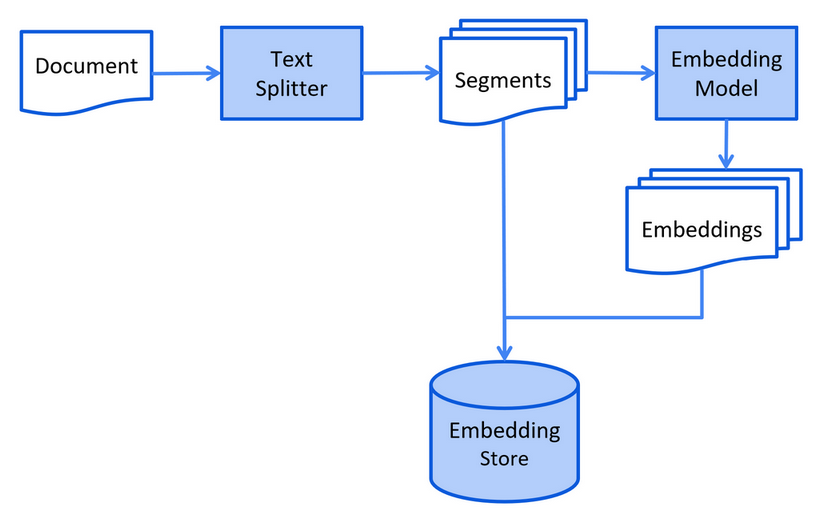
7.3 Document Processing Pipeline

1
2
Document → Parse → Split → Embed → Store
(PDF/MD) (Chunks) (Vectors) (Vector DB)

Why split documents?

  • LLM context windows are limited
  • Smaller chunks = more precise retrieval
  • Reduces noise from irrelevant content

7.4 Implementing RAG

Step 1: Load and Process Documents

1
2
3
4
5
// Load hospital information documents
Document hospitalDoc = FileSystemDocumentLoader.loadDocument(
"knowledge/hospital-info.md");
Document deptDoc = FileSystemDocumentLoader.loadDocument(
"knowledge/departments.md");

Step 2: Create Vector Store

1
2
3
4
5
6
7
8
9
10
11
12
13
14
15
16
17
18
@Bean
ContentRetriever contentRetriever(EmbeddingModel embeddingModel) {
// Load documents
List<Document> documents = Arrays.asList(
FileSystemDocumentLoader.loadDocument("knowledge/hospital-info.md"),
FileSystemDocumentLoader.loadDocument("knowledge/departments.md"),
FileSystemDocumentLoader.loadDocument("knowledge/doctors.md")
);

// In-memory store (use Pinecone/Milvus for production)
InMemoryEmbeddingStore<TextSegment> store = new InMemoryEmbeddingStore<>();

// Process and store
EmbeddingStoreIngestor.ingest(documents, store);

// Create retriever
return EmbeddingStoreContentRetriever.from(store);
}

Step 3: Configure AIService with RAG

1
2
3
4
5
6
7
8
9
10
11
12
@AiService(
wiringMode = EXPLICIT,
chatModel = "openAiChatModel",
chatMemoryProvider = "chatMemoryProvider",
tools = "appointmentTools",
contentRetriever = "contentRetriever" // RAG component
)
public interface MedicalAssistant {

@SystemMessage(fromResource = "medical-assistant-prompt.txt")
String chat(@MemoryId Long id, @UserMessage String message);
}

Production Vector Database - Pinecone:

1
2
3
4
5
6
7
8
9
10
11
12
13
@Bean
EmbeddingStore<TextSegment> embeddingStore(EmbeddingModel model) {
return PineconeEmbeddingStore.builder()
.apiKey(System.getenv("PINECONE_API_KEY"))
.index("medical-kb")
.nameSpace("hospital-info")
.createIndex(PineconeServerlessIndexConfig.builder()
.cloud("AWS")
.region("us-east-1")
.dimension(model.dimension()) // 1024 for text-embedding-v3
.build())
.build();
}

8. Putting It All Together

8.1 Complete Agent Configuration

MedicalAssistant.java:

1
2
3
4
5
6
7
8
9
10
11
12
13
14
15
16
17
18
19
20
21
package com.example.assistant;

import dev.langchain4j.service.*;
import dev.langchain4j.service.spring.AiService;
import static dev.langchain4j.service.spring.AiServiceWiringMode.EXPLICIT;

@AiService(
wiringMode = EXPLICIT,
chatModel = "openAiChatModel",
chatMemoryProvider = "chatMemoryProvider",
tools = "appointmentTools",
contentRetriever = "contentRetriever"
)
public interface MedicalAssistant {

@SystemMessage(fromResource = "medical-assistant-prompt.txt")
String chat(
@MemoryId Long conversationId,
@UserMessage String userMessage
);
}

medical-assistant-prompt.txt:

1
2
3
4
5
6
7
8
9
10
11
12
13
14
15
16
You are "MediBot", an AI assistant for Peking Union Medical College Hospital.

Your capabilities:
1. Medical consultation - provide general health information
2. Department guidance - help patients find the right department
3. Doctor information - answer questions about our doctors
4. Appointment management - book and cancel appointments

Rules:
- Always verify patient identity (name + ID card) before appointments
- Confirm appointment details before booking
- Use the knowledge base for hospital-specific information
- Be professional yet friendly
- Add appropriate emoji to make responses warm

Today is {{current_date}}.

8.2 Controller Layer

1
2
3
4
5
6
7
8
9
10
11
12
13
14
15
16
17
18
19
20
@RestController
@RequestMapping("/api/medical")
@Tag(name = "Medical AI Assistant")
public class MedicalController {

@Autowired
private MedicalAssistant assistant;

@PostMapping("/chat")
@Operation(summary = "Chat with medical assistant")
public String chat(@RequestBody ChatRequest request) {
return assistant.chat(request.getConversationId(), request.getMessage());
}
}

@Data
public class ChatRequest {
private Long conversationId; // Unique per user session
private String message;
}

9. Best Practices

System Design

Practice Why It Matters
Use @MemoryId for multi-user Prevents conversation bleeding between users
Persistent chat memory Don’t lose context on server restart
Tool descriptions Clear descriptions help LLM choose correctly
Document chunking Smaller chunks improve retrieval precision
Min score threshold Filters low-relevance results

Security

1
2
# Never commit API keys
langchain4j.open-ai.chat-model.api-key=${OPENAI_API_KEY}

Performance

1
2
3
4
5
6
7
8
// Limit chat memory to control token usage
MessageWindowChatMemory.withMaxMessages(10)

// Set minScore to filter irrelevant documents
EmbeddingStoreContentRetriever.builder()
.minScore(0.8)
.maxResults(3)
.build()

Common Pitfalls

Pitfall Solution
LLM doesn’t use tools Improve tool descriptions
Wrong tool parameters Use @P annotations with clear descriptions
Out-of-scope responses Refine system message
Slow responses Use streaming output for real-time feedback

10. FAQ

Q: Can I switch from OpenAI to DeepSeek without code changes?

A: Yes. Just change the configuration:

1
2
3
4
5
6
7
# From OpenAI
langchain4j.open-ai.chat-model.base-url=https://api.openai.com/v1
langchain4j.open-ai.chat-model.api-key=${OPENAI_KEY}

# To DeepSeek
langchain4j.open-ai.chat-model.base-url=https://api.deepseek.com
langchain4j.open-ai.chat-model.api-key=${DEEPSEEK_KEY}

Q: How do I handle sensitive medical data?

A:

  • Use local LLMs via Ollama for sensitive data
  • Implement data anonymization before sending to external APIs
  • Store chat history encrypted
  • Follow HIPAA/GDPR compliance requirements

Q: What’s the difference between ChatMemory and ChatMemoryProvider?

A:

  • ChatMemory: Single shared memory instance
  • ChatMemoryProvider: Factory that creates isolated memory per memoryId

Q: How do I update the knowledge base?

A: Simply add new documents and re-ingest:

1
2
3
4
5
// New document
Document newDoc = FileSystemDocumentLoader.loadDocument("new-policy.md");

// Add to existing store
EmbeddingStoreIngestor.ingest(newDoc, embeddingStore);

Q: Can the LLM call multiple tools in one conversation?

A: Yes. The LLM can chain tool calls:

1
2
3
4
5
User: "Book Dr. Wang and check if Dr. Li is available next week"

LLM → Calls bookAppointment(...)
→ Calls checkAvailability(...)
→ Responds with both results

11. Summary

We built a medical AI assistant using LangChain4J with:

  1. Spring Boot Integration - Auto-configuration and dependency injection
  2. LLM Integration - Unified API for OpenAI, DeepSeek, and others
  3. Chat Memory - Persistent conversation context
  4. Function Calling - Java methods callable by the LLM
  5. RAG - Knowledge retrieval from documents

Key Takeaways:

  • LangChain4J abstracts LLM complexity behind simple interfaces
  • AIService pattern keeps code clean and testable
  • Chat memory enables natural multi-turn conversations
  • Function calling bridges LLM reasoning with business logic
  • RAG grounds the LLM in your specific domain knowledge

Next Steps:

  • Add streaming responses for better UX
  • Implement multi-modal support (images)
  • Add evaluation framework for response quality
  • Deploy with Docker and Kubernetes

Project Link:

SmartMed-LangChain4j-RAG
If you find this repo useful, a star would be much appreciated. ⭐⭐⭐

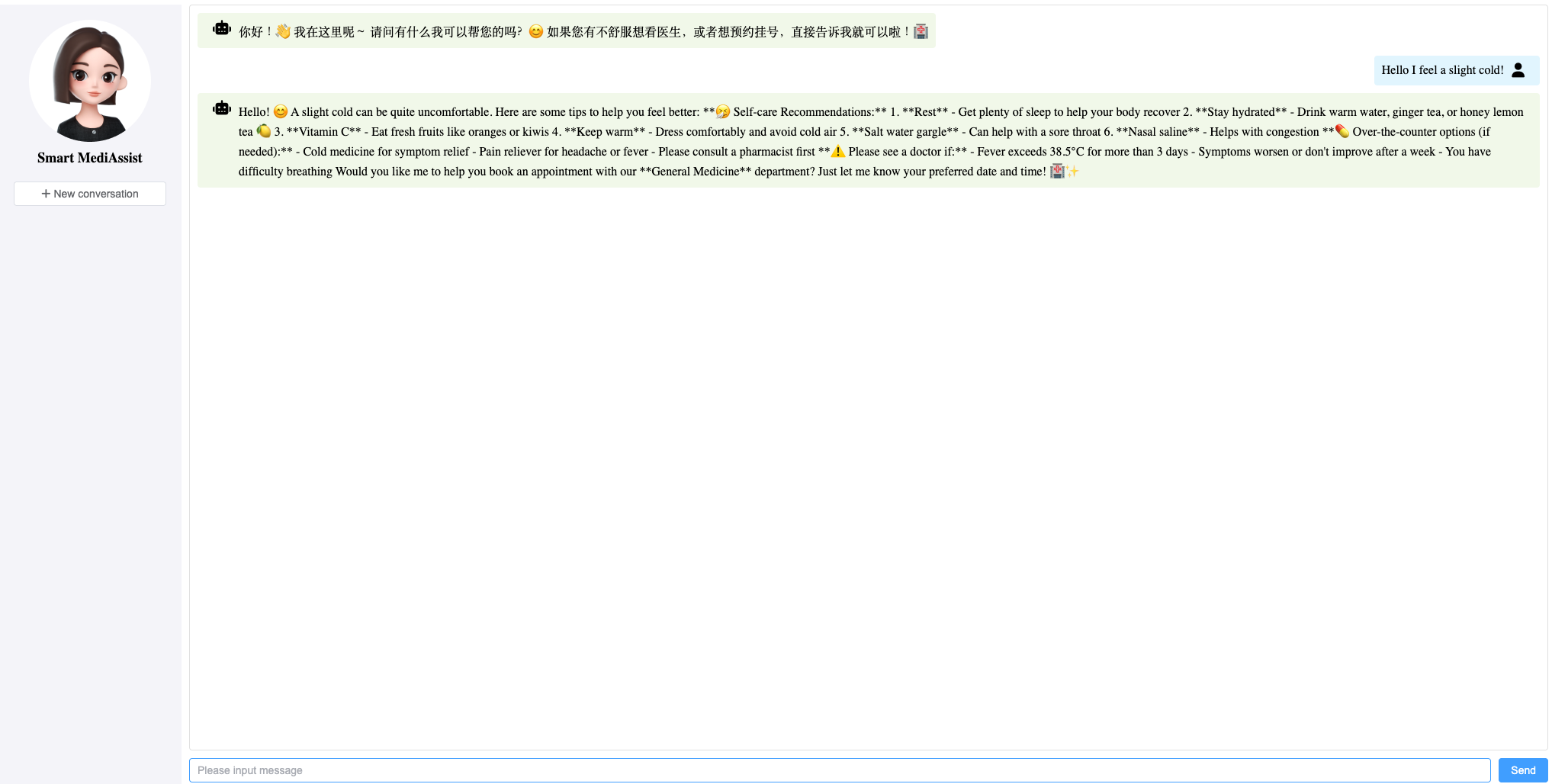
Demo:

pic

References

Author: Alex

Article Link: https://bodysuperman.github.io/2026/04/27/LangChain4J-in-Action-Building-a-Medical-AI-Assistant-Agent/

License: This article is licensed under CC BY-NC-SA 4.0. Please credit the original author and include the source link when reposting.