什么是 RabbitMQ
环境搭建
管理用户和权限 场景:生产者发送消息,消费者接收消息
高级特性:确保消息可靠投递
最佳实践
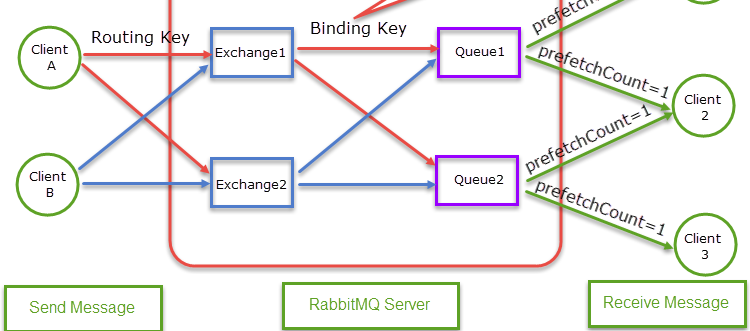
什么是 RabbitMQ? RabbitMQ 是一款开源消息中间件,实现了 AMQP 协议(高级消息队列协议),专为分布式系统中的异步通信而设计。它促进应用程序之间的异步通信,实现解耦和可扩展架构。它支持多种编程语言,提供消息持久化、流量控制和集群部署等功能,广泛应用于微服务架构、异步任务处理和系统解耦。
核心概念
概念 描述
生产者(Producer) 向交换机发送消息的应用程序。
消费者(Consumer) 从队列接收消息并处理的应用程序。
交换机(Exchange) 确定消息路由规则的组件,根据绑定将消息分发到队列。
队列(Queue) 存储消息的容器,消费者从中拉取消息。
绑定(Binding) 建立交换机和队列之间的关系,定义路由条件(如路由键)。
AMQP 定义通信标准的应用层协议,用于可靠的消息传递。
环境搭建 Docker(推荐): 拉取 RabbitMQ Docker 镜像
1 docker pull rabbitmq:management
启动一个 RabbitMQ 实例,并将主机上的自定义配置文件挂载到容器中。
1
2
3
4
5
6
docker run -id --name=rabbitmq -v rabbitmq-home:/var/lib/rabbitmq -p 15672:15672 -p 5672:5672 -e RABBITMQ_DEFAULT_USER=*** -e RABBITMQ_DEFAULT_PASS=*** rabbitmq:management
-d 以分离模式运行容器。
–name 为容器分配一个名称。
-p 将容器端口映射到宿主机。端口 5672 用于 RabbitMQ 服务,15672 用于管理界面。
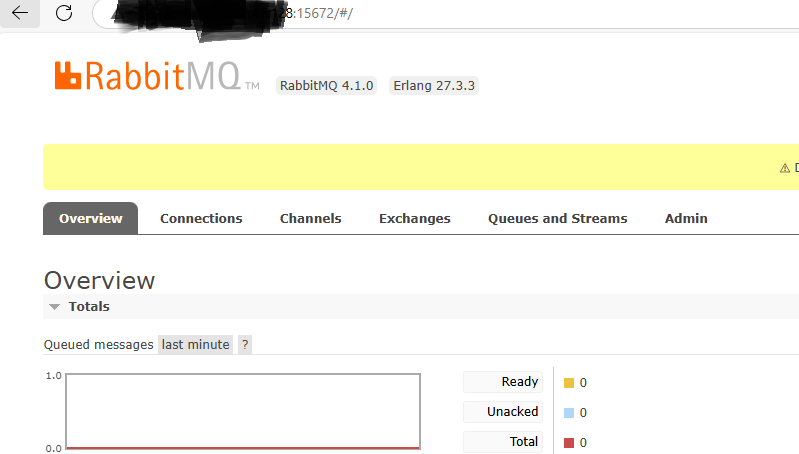
打开浏览器,访问 http://localhost:15672/。
使用你在上述命令中设置的默认用户名和密码登录。
管理用户和权限 要添加用户,使用 rabbitmqctl add_user。
要为用户在虚拟主机中授予权限,使用 rabbitmqctl set_permissions:
要删除用户,使用 rabbitmqctl delete_user:
1 rabbitmqctl delete_user 'username'
要撤销用户在虚拟主机中的权限,使用 rabbitmqctl clear_permissions:
1 rabbitmqctl clear_permissions -p "custom-vhost" "username"
场景:生产者发送消息,消费者接收消息 生产者代码 1 2 3 4 5 6 7 8 9 10 11 12 13 14 15 16 17 18 19 20 21 22 23 24 25 26 27 28 29 30 31 32 33 34 35 class Producer { private const string QueueName = "simple_queue"; public static void SendMessage(string message) { var factory = new ConnectionFactory() { HostName = "***", VirtualHost = "visual_knitting", UserName = "admin", Password = "123456", Port = 5672 }; using (var connection = factory.CreateConnection()) using (var channel = connection.CreateModel()) { channel.QueueDeclare( queue: QueueName, durable: false, // Store in memory (non-persistent) exclusive: false, // Non-exclusive queue autoDelete: false, // Do not auto-delete when empty arguments: null ); var body = Encoding.UTF8.GetBytes(message); channel.BasicPublish( exchange: "", // Use default exchange (direct to queue) routingKey: QueueName, // Routing key matches queue name basicProperties: null, body: body ); Console.WriteLine($"[Producer] Sent: {message}"); } } }
消费者代码 1 2 3 4 5 6 7 8 9 10 11 12 13 14 15 16 17 18 19 20 21 22 23 24 25 26 27 28 29 30 31 32 33 34 35 36 37 38 39 40 class Consumer { private const string QueueName = "simple_queue"; public static void StartListening() { var factory = new ConnectionFactory() { var factory = new ConnectionFactory() { HostName = "***", VirtualHost = "visual_knitting", UserName = "admin", Password = "123456", Port = 5672 }; }; using (var connection = factory.CreateConnection()) using (var channel = connection.CreateModel()) { channel.QueueDeclare(QueueName, false, false, false, null); var consumer = new EventingBasicConsumer(channel); consumer.Received += (model, ea) => { var body = ea.Body.ToArray(); var message = Encoding.UTF8.GetString(body); Console.WriteLine($"[Consumer] Received: {message}"); }; channel.BasicConsume( queue: QueueName, autoAck: true, // Auto-acknowledge messages upon receipt consumer: consumer ); Console.WriteLine("Consumer is waiting for messages. Press any key to exit."); Console.ReadKey(); } } }
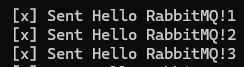
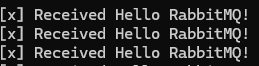
运行测试: 从生产者发送消息:
高级特性:确保消息可靠投递 消息持久化 场景:防止 RabbitMQ 重启时消息丢失
队列持久化:声明队列时设置 durable: true。
消息持久化:设置 BasicProperties.Persistent = true。1 2 3 4 5 6 // Producer code for persistence channel.QueueDeclare(QueueName, durable: true, ...); var properties = channel.CreateBasicProperties(); properties.Persistent = true; // Make messages persistent channel.BasicPublish(..., basicProperties: properties, ...);
发布者确认(Publisher Confirms) 场景:确保消息成功到达 RabbitMQ 服务器
1 2 3 4 5 6 7 8 9 10 11 12 // Enable publisher confirms channel.ConfirmSelect(); channel.BasicPublish(...); if (channel.WaitForConfirms(TimeSpan.FromSeconds(5))) { Console.WriteLine("Message confirmed by server."); } else { Console.WriteLine("Message confirmation timed out."); }
消费者手动确认(Manual Acknowledgment) 场景:避免丢失未处理的消息(例如消费者崩溃时)
1 2 3 4 5 6 7 8 9 10 11 12 13 14 15 16 17 18 19 20 // Consumer code with manual acknowledgment (autoAck: false) channel.BasicConsume( queue: QueueName, autoAck: false, // Disable auto-acknowledgment consumer: consumer ); consumer.Received += (model, ea) => { var deliveryTag = ea.DeliveryTag; try { // Process the message... channel.BasicAck(deliveryTag, multiple: false); // Acknowledge single message } catch (Exception) { channel.BasicNack(deliveryTag, multiple: false, requeue: true); // Requeue the message } };
最佳实践 消息格式 使用 JSON 格式处理结构化数据,例如:
1
2
3
4
5
{ "MessageId": "12**", "Content": "Order created", "Timestamp": "2025-03-22T12:00:00" }
监控
使用 RabbitMQ 管理仪表板检查队列状态、连接和资源使用情况。
使用 dotnet trace 或 Prometheus + Grafana 等工具监控性能。