0%

设计模式

  1. 简介
  2. 创建型模式
  3. 结构型模式
  4. 行为型模式

简介

设计模式并非可以直接移植到源代码中的固定结构,而是一种描述或模板,用于解决特定类型的问题,可以应用于多种不同的场景。设计模式可以被视为形式化的最佳实践,程序员可以使用它们来解决设计软件应用或系统时的常见问题。经验丰富的面向对象软件工程师利用这些最佳实践来编写更具结构性、可管理性和可扩展性的代码。设计模式提供了标准化的术语,并针对特定的场景和问题。

面向对象设计模式通常展示类或对象之间的关系和交互,而无需指定所涉及的具体应用类或对象。暗示可变状态的模式可能不适用于函数式编程语言。某些模式在那些已内置了问题解决方案的语言中可能变得不再必要,而面向对象模式也不一定适用于非面向对象的语言。

设计模式的类型

  • 创建型模式(Creational Patterns)
  • 结构型模式(Structural Patterns)
  • 行为型模式(Behavioral Patterns)

设计模式的主要特征

  • 可复用性:模式可以应用于不同的项目和问题,在解决类似问题时节省时间和精力。
  • 标准化:它们为开发者提供了共享的语言和理解,有助于沟通和协作。
  • 高效性:通过使用这些成熟的模式,开发者可以避免反复寻找相同问题的解决方案,从而加快开发速度。
  • 灵活性:模式是抽象的解决方案/模板,可以根据各种场景和需求进行调整。

创建型模式

核心目的:封装对象创建逻辑,将对象的创建与使用解耦。

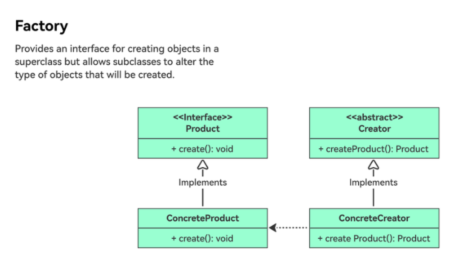
工厂模式
pic
定义:使用工厂类来封装对象创建,隐藏实现细节。
案例:在电商平台中创建不同的支付方式。

1
2
3
4
5
6
7
8
9
10
11
12
13
14
15
16
17
18
19
20
21
22
23
24
25
26
27
28
29
30
31
32
33
34
35
36
37
38
39
40
41
42
43
44
45
46
// Abstract Product: Payment interface  
public interface IPayment
{
void Pay(decimal amnout);
}

// Concrete Product: Alipay Payment
public class AlipayPayment: IPayment
{
public void Pay(decimal amount)
{
Console.WriteLine($"Alipay Payment: {amount:C}");
}
}

public class PaypalPayment: IPayment
{
public void Pay(decimal amount)
{
Console.WriteLine($"Paypal Payment: {amount:C}");
}
}

// Factory Class
public class PaymentFactory
{
public static IPayment CreatePayment(string type)
{
if (type == "Alipay")
{
return new AlipayPayment();
}
else if (type == "Paypal")
{
// Assuming a PaypalPayment class exists and implements IPayment
return new PaypalPayment();
}
else
{
throw new ArgumentException("Unsupported payment type");
}
}
}
//usage
var pay = PaymentFactory.CreatePayment("Paypal");
pay.Pay(199.99m);// Output: Paypal Payment: $199.99

抽象工厂

pic
抽象工厂模式(Abstract Factory Pattern) 是一种创建型设计模式,它提供了一个接口,用于创建一系列相关或相互依赖的对象,而无需指定它们的具体类。它封装了一组具有共同主题的独立工厂,确保产品的兼容性,并将客户端代码与实现细节解耦。
核心概念:

  1. 抽象工厂(Abstract Factory):定义创建抽象产品的接口。
  2. 具体工厂(Concrete Factories):实现抽象工厂以生产特定的产品族。
  3. 抽象产品(Abstract Products):声明一类产品的接口。
  4. 具体产品(Concrete Products):实现抽象产品接口,由具体工厂创建。
  5. 客户端(Client):使用抽象工厂和产品,而不依赖具体类。

UML 图:

1
2
3
4
5
6
7
8
9
10
11
12
13
14
15
16
17
18
19
20
21
22
23
24
25
26
27
┌──────────────────┐       ┌─────────────────┐
│ AbstractFactory │ │ Client │
├──────────────────┤ ├─────────────────┤
│+ CreateProductA()│◄───► │+ UseFactory() │
│+ CreateProductB()│ └─────────────────┘
└──────────────────┘
▲
│
┌─────┴─────┐ ┌───────────────────┐
│ │ │ ConcreteFactory2 │
│ConcreteFactory1├────►┌─────────────┐ │
├─────────────┐ │ │+ CreateProductA()│
│+ CreateProductA()│ │+ CreateProductB()│
│+ CreateProductB()│ └─────────────┘ │
└─────────────┘ └───────────────────┘

┌─────────────┐ ┌─────────────┐
│AbstractProductA│ │AbstractProductB │
├─────────────┤ ├─────────────┤
│+ OperationA()│ │+ OperationB() │
└─────────────┘ └─────────────┘
▲ ▲
│ │
┌─────┴─────┐ ┌─────┴─────┐
│ │ │ │
│ProductA1 │ │ProductB1 │
└───────────┘ └───────────┘

案例:跨平台 UI 组件(Windows 与 macOS)

1
2
3
4
5
6
7
8
9
10
11
12
13
14
15
16
17
18
19
20
21
22
23
24
25
26
27
28
29
30
31
32
33
34
35
36
37
38
39
40
41
42
43
44
45
46
47
48
49
50
51
52
53
54
55
56
57
58
59
60
61
62
63
64
65
66
67
68
69
70
71
72
73
74
75
76
77
78
79
80
81
82
83
84
85
86
87
// Button Interface
public interface IButton
{
void Render();
}

// Checkbox Interface
public interface ICheckbox
{
void Render();
}
// Button Interface
public interface IButton
{
void Render();
}

// Checkbox Interface
public interface ICheckbox
{
void Render();
}

// Windows Products
public class WindowsButton : IButton
{
public void Render() => Console.WriteLine("Windows Button Rendered");
}

public class WindowsCheckbox : ICheckbox
{
public void Render() => Console.WriteLine("Windows Checkbox Rendered");
}

// macOS Products
public class MacButton : IButton
{
public void Render() => Console.WriteLine("Mac Button Rendered");
}

public class MacCheckbox : ICheckbox
{
public void Render() => Console.WriteLine("Mac Checkbox Rendered");
}

// Windows Factory
public class WindowsFactory : IGUIFactory
{
public IButton CreateButton() => new WindowsButton();
public ICheckbox CreateCheckbox() => new WindowsCheckbox();
}

// macOS Factory
public class MacFactory : IGUIFactory
{
public IButton CreateButton() => new MacButton();
public ICheckbox CreateCheckbox() => new MacCheckbox();
}

public class Application
{
private readonly IButton _button;
private readonly ICheckbox _checkbox;

public Application(IGUIFactory factory)
{
_button = factory.CreateButton();
_checkbox = factory.CreateCheckbox();
}

public void RenderUI()
{
_button.Render();
_checkbox.Render();
}
}

// Usage
class Program
{
static void Main()
{
IGUIFactory factory = new WindowsFactory(); // Or new MacFactory()
var app = new Application(factory);
app.RenderUI();
}
}

使用场景:

  • 跨平台应用:如上面的示例所示。
  • 游戏开发:创建不同类型的敌人、武器或环境。
  • 数据库访问:在 SQL Server、MySQL 等之间切换。
  • UI 框架:生成主题化组件(浅色/深色模式)。

建造者模式

pic
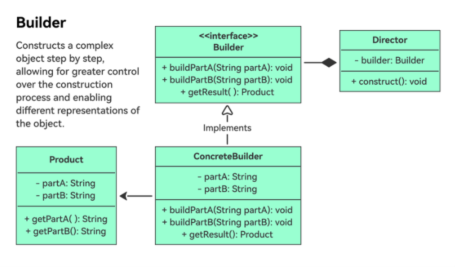
建造者模式(Builder Pattern) 是一种创建型设计模式,它将复杂对象的构建过程与其表示分离。这使得相同的构建过程可以创建不同的表示,非常适合具有多个可选参数或复杂装配步骤的对象。
核心概念:

  1. 产品(Product):正在构建的复杂对象(例如汽车、用户资料)。
  2. 抽象建造者(Abstract Builder):定义构建产品各部分的接口。
  3. 具体建造者(Concrete Builder):实现建造者接口以构建特定的产品变体。
  4. 指挥者(Director):控制构建过程,使用建造者逐步组装产品。

UML 图:

1
2
3
4
5
6
7
8
9
10
11
12
13
14
15
16
17
18
19
20
21
22
┌───────────┐          ┌─────────────┐  
│ Product │ │ Director │
│+ parts: │ │+ Construct()│
│ List<str>│ └─────────────┘
│+ AddPart()│ ▲
│+ Show() │ │
└───────────┘ │ uses
│
┌──────────────┐ │ uses
│ AbstractBuilder│ │
│+ BuildPartA() │◄─────┘
│+ BuildPartB() │
│+ GetResult() │
└──────────────┘
▲ ▲
│ │
┌──────────────┐ ┌──────────────┐
│ ConcreteBuilder1│ │ ConcreteBuilder2│
│+ BuildPartA() │ │+ BuildPartA() │
│+ BuildPartB() │ │+ BuildPartB() │
│+ GetResult() │ │+ GetResult() │
└──────────────┘ └──────────────┘

案例:组装一台带有可选组件(CPU、GPU、内存)的电脑。

1
2
3
4
5
6
7
8
9
10
11
12
13
14
15
16
17
18
19
20
21
22
23
24
25
26
27
28
29
30
31
32
33
34
35
36
37
38
39
40
41
42
43
44
45
46
47
48
49
50
51
52
53
54
55
56
57
58
59
60
61
62
63
64
65
66
67
68
69
70
71
72
73
74
75
76
77
78
79
80
81
82
83
84
85
86
87
88
89
90
91
92
93
94
95
96
97
//define the product
public class Computer
{
private List<string> _parts = new List<string>();

public void AddPart(string part)
{
_parts.Add(part);
}

public void ShowSpecs()
{
Console.WriteLine("Computer Specs:");
foreach (var part in _parts)
{
Console.WriteLine($"- {part}");
}
}
}
//2. Create the Abstract Builder
public abstract class ComputerBuilder
{
protected Computer _computer = new Computer();

public abstract void BuildCPU();
public abstract void BuildGPU();
public abstract void BuildRAM();

public Computer GetComputer()
{
return _computer;
}
}
//3.Implement Concrete Builders
public class GamingComputerBuilder : ComputerBuilder
{
public override void BuildCPU()
{
_computer.AddPart("High-end CPU (e.g., Intel i9)");
}

public override void BuildGPU()
{
_computer.AddPart("Dedicated Gaming GPU (e.g., NVIDIA RTX 4090)");
}

public override void BuildRAM()
{
_computer.AddPart("32GB DDR5 RAM");
}
}

public class OfficeComputerBuilder : ComputerBuilder
{
public override void BuildCPU()
{
_computer.AddPart("Mid-range CPU (e.g., Intel i5)");
}

public override void BuildGPU()
{
_computer.AddPart("Integrated GPU");
}

public override void BuildRAM()
{
_computer.AddPart("16GB DDR4 RAM");
}
}
//4. Define the Director
public class ComputerDirector
{
public Computer Construct(ComputerBuilder builder)
{
builder.BuildCPU();
builder.BuildGPU();
builder.BuildRAM();
return builder.GetComputer();
}
}
//5.Client Code
public class Program
{
public static void Main()
{
// Build a gaming computer
var gamingBuilder = new GamingComputerBuilder();
var director = new ComputerDirector();
var gamingPC = director.Construct(gamingBuilder);
gamingPC.ShowSpecs();

// Build an office computer
var officeBuilder = new OfficeComputerBuilder();
var officePC = director.Construct(officeBuilder);
officePC.ShowSpecs();
}
}

输出:

1
2
3
4
5
6
7
8
9
Computer Specs:  
- High-end CPU (e.g., Intel i9)
- Dedicated Gaming GPU (e.g., NVIDIA RTX 4090)
- 32GB DDR5 RAM

Computer Specs:
- Mid-range CPU (e.g., Intel i5)
- Integrated GPU
- 16GB DDR4 RAM

使用场景:

  1. 具有大量参数的复杂对象:例如汽车、用户资料或带有可选字段的 API 请求。
  2. 有顺序依赖的对象组装:当各部分必须按特定顺序添加时(例如在最终组装之前初始化组件)。
  3. 流式接口(Fluent Interface):常用于创建可读性强的流畅 API(例如 .NET 中的 StringBuilder)。

单例模式
pic
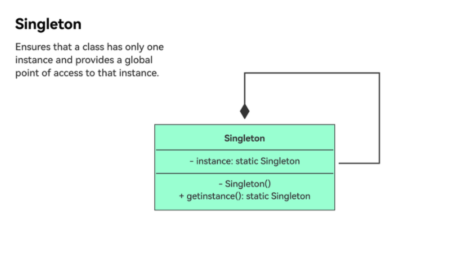
单例模式(Singleton Pattern) 是一种创建型设计模式,它确保一个类只有一个实例,并提供一个全局访问点。该模式适用于系统中恰好需要一个实例来协调操作的场景,例如数据库连接池、日志服务或配置管理器。
核心概念:

  1. 私有构造函数:防止外部直接实例化该类。
  2. 静态实例:持有该类的唯一实例。
  3. 公共静态访问器:提供对该实例的全局访问。
    UML 图:
    1
    2
    3
    4
    5
    6
    7
    ┌───────────────┐  
    │ Singleton │
    ├───────────────┤
    │- instance: static Singleton
    │+ GetInstance(): static Singleton
    │+ DoSomething(): void
    └───────────────┘
    实现变体:
  4. 基本单例(非线程安全)
    1
    2
    3
    4
    5
    6
    7
    8
    9
    10
    11
    12
    13
    14
    15
    16
    17
    18
    19
    20
    public class Singleton  
    {
    private static Singleton _instance;

    private Singleton() { } // Private constructor

    public static Singleton GetInstance()
    {
    if (_instance == null)
    {
    _instance = new Singleton();
    }
    return _instance;
    }

    public void DoSomething()
    {
    Console.WriteLine("Singleton is working.");
    }
    }
    问题:非线程安全。在多线程环境中,多个线程可能同时创建实例。
  5. 线程安全单例(双重检查锁定)
    1
    2
    3
    4
    5
    6
    7
    8
    9
    10
    11
    12
    13
    14
    15
    16
    17
    18
    19
    20
    21
    22
    23
    24
    25
    26
    27
    public class Singleton  
    {
    private static Singleton _instance;
    private static readonly object _lock = new object();

    private Singleton() { }

    public static Singleton GetInstance()
    {
    if (_instance == null) // First check
    {
    lock (_lock) // Lock for thread safety
    {
    if (_instance == null) // Second check
    {
    _instance = new Singleton();
    }
    }
    }
    return _instance;
    }

    public void DoSomething()
    {
    Console.WriteLine("Singleton is working.");
    }
    }
  6. 使用 Lazy 的延迟初始化
    1
    2
    3
    4
    5
    6
    7
    8
    9
    10
    11
    12
    13
    14
    15
    16
    17
    public class Singleton  
    {
    private static readonly Lazy<Singleton> _lazy =
    new Lazy<Singleton>(() => new Singleton());

    private Singleton() { }

    public static Singleton GetInstance()
    {
    return _lazy.Value;
    }

    public void DoSomething()
    {
    Console.WriteLine("Singleton is working.");
    }
    }
    使用场景:
  • 日志服务:集中式日志记录以避免文件冲突。
  • 数据库连接池:复用连接以优化性能。
  • 配置管理器:加载和管理应用设置。
  • 图形管理器:控制渲染或显示资源。

结构型模式

结构型设计模式阐释了如何将对象和类组装成更大的结构,同时保持这些结构的灵活性和高效性。

适配器模式

pic
适配器模式(Adapter Pattern) 是一种结构型设计模式,它允许接口不兼容的对象之间进行协作。它充当两个不兼容接口之间的桥梁,将一个类的接口转换为客户端期望的另一个接口。该模式对于集成遗留代码、第三方库或不匹配的组件非常有用,且无需修改其原始结构。
核心概念:

  1. 目标接口(Target):客户端期望交互的接口。
  2. 被适配者(Adaptee):具有不兼容接口的现有类。
  3. 适配器(Adapter):通过组合或继承将被适配者的接口转换为目标接口。
    UML 图:
    1
    2
    3
    4
    5
    6
    7
    8
    9
    10
    ┌─────────────┐       ┌──────────────┐       ┌─────────────┐  
    │ Target │ │ Adapter │ │ Adaptee │
    ├─────────────┤ ├──────────────┤ ├─────────────┤
    │+ Request() │◄───┐ │+ Request() │ │+ SpecificRequest()
    └─────────────┘ │ ├──────────────┤ └─────────────┘
    │ │- adaptee: Adaptee│ ▲
    │ └──────────────┘ │
    │ ▲ │
    │ │ Implements │
    └─────────────────────────────┘
  4. 对象适配器(组合)
    1
    2
    3
    4
    5
    6
    7
    8
    9
    10
    11
    12
    13
    14
    15
    16
    17
    18
    19
    20
    21
    22
    23
    24
    25
    26
    27
    28
    29
    30
    31
    32
    33
    34
    35
    36
    37
    38
    39
    40
    41

    // Target interface
    public interface ITarget
    {
    string Request();
    }

    // Adaptee (existing class with incompatible interface)
    public class Adaptee
    {
    public string SpecificRequest()
    {
    return "Specific request from adaptee.";
    }
    }

    // Adapter (wraps the adaptee via composition)
    public class Adapter : ITarget
    {
    private readonly Adaptee _adaptee;

    public Adapter(Adaptee adaptee)
    {
    _adaptee = adaptee;
    }

    public string Request()
    {
    // Convert the adaptee's interface to the target interface
    return $"Adapter: {_adaptee.SpecificRequest()}";
    }
    }

    // Client code
    public class Client
    {
    public void UseTarget(ITarget target)
    {
    Console.WriteLine(target.Request());
    }
    }
    用法:
    1
    2
    3
    4
    var adaptee = new Adaptee();  
    var adapter = new Adapter(adaptee);
    var client = new Client();
    client.UseTarget(adapter); // Output: Adapter: Specific request from adaptee.
  5. 类适配器(继承)
    1
    2
    3
    4
    5
    6
    7
    8
    9
    10
    11
    12
    13
    14
    15
    16
    17
    18
    19
    20
    21
    22
    23
    24

    // Target interface
    public interface ITarget
    {
    string Request();
    }

    // Adaptee (existing class with incompatible interface)
    public class Adaptee
    {
    public string SpecificRequest()
    {
    return "Specific request from adaptee.";
    }
    }

    // Adapter (inherits from both target and adaptee)
    public class Adapter : Adaptee, ITarget
    {
    public string Request()
    {
    return $"Adapter: {base.SpecificRequest()}";
    }
    }
    注意:类适配器需要多重继承(C# 不支持),因此本示例改用组合方式。
    使用场景:
  6. 遗留系统集成:将新代码与过时的 API 连接起来。
  7. 第三方库:调整外部库以匹配应用程序的接口。
  8. 数据格式转换:在不兼容的格式之间转换数据(例如 XML 转 JSON)。
  9. 跨平台兼容性:将平台特定的 API 适配为通用接口。
    实际案例:
  • .NET Framework:StreamReader 将 Stream 适配为文本读取器。
  • Java:java.util.Arrays.asList() 将数组适配为 List。
  • Web API:将 REST API 响应转换为内部数据模型。

桥接模式

pic
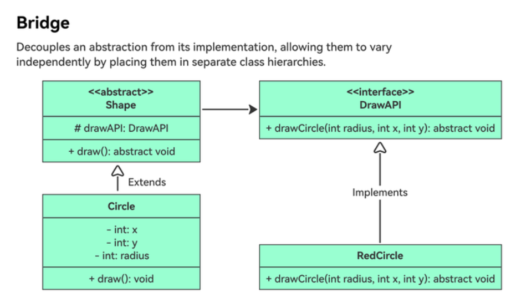
桥接模式(Bridge Pattern) 是一种结构型设计模式,它将抽象与实现解耦,使两者可以独立变化。它通过将层次化的抽象(系统做什么)与实现(如何做)分离,并通过桥接接口连接来实现。该模式对于避免在处理多个变化维度时出现”类爆炸”特别有用。
核心概念:

  1. 抽象(Abstraction):定义高层接口,并依赖于实现接口。
  2. 扩展抽象(Refined Abstraction):扩展抽象而不影响实现。
  3. 实现者(Implementor):定义实现类的接口。
  4. 具体实现者(Concrete Implementor):提供具体的实现。
    UML 图:
    1
    2
    3
    4
    5
    6
    7
    8
    9
    10
    11
    12
    13
    14
    15
    16
    17
    18
    19
    20
    ┌────────────────┐                  ┌────────────────┐  
    │ Abstraction │ │ Implementor │
    ├────────────────┤ ├────────────────┤
    │- implementor │ │+ OperationImpl()│
    │+ Operation() │ └────────────────┘
    └────────────────┘ ▲
    ▲ │
    │ │
    ┌────────────────┐ ┌─────────────────────┐
    │RefinedAbstraction│ │ ConcreteImplementorA │
    ├────────────────┤ ├─────────────────────┤
    │+ ExtendedOperation()│ │+ OperationImpl() │
    └────────────────┘ └─────────────────────┘
    │
    │
    ┌─────────────────────┐
    │ ConcreteImplementorB │
    ├─────────────────────┤
    │+ OperationImpl() │
    └─────────────────────┘
    实现示例
    场景:以不同格式(矢量、光栅)渲染图形(圆形、正方形)。
1
2
3
4
5
6
7
8
9
10
11
12
13
14
15
16
17
18
19
20
21
22
23
24
25
26
27
28
29
30
31
32
33
34
35
36
37
38
39
40
41
42
43
44
45
46
47
48
49
50
51
52
53
54
55
56
57
58
59
60
61
62
63
64
65
66
67
68
69
70
71
72
73
74
75
76
77
78
79
80
81
82
83
84
85
86
87
88
89
90
91
92
93
94
95
96
97
98
99
100
101
102
103
104
105
106
107
108
109
110
111
112
113
114
//Define the Implementor Interface
// Implementor: Renderer
public interface IRenderer
{
void RenderCircle(float radius);
void RenderSquare(float side);
}
//2. Implement Concrete Implementors
// Vector Renderer
public class VectorRenderer : IRenderer
{
public void RenderCircle(float radius)
{
Console.WriteLine($"Drawing a circle of radius {radius} in vector format.");
}

public void RenderSquare(float side)
{
Console.WriteLine($"Drawing a square with side {side} in vector format.");
}
}

// Raster Renderer
public class RasterRenderer : IRenderer
{
public void RenderCircle(float radius)
{
Console.WriteLine($"Drawing pixels for a circle of radius {radius} in raster format.");
}

public void RenderSquare(float side)
{
Console.WriteLine($"Drawing pixels for a square with side {side} in raster format.");
}
}
//3. Define the Abstraction
// Abstraction: Shape
public abstract class Shape
{
protected IRenderer renderer;

public Shape(IRenderer renderer)
{
this.renderer = renderer;
}

public abstract void Draw();
public abstract void Resize(float factor);
}
//4.Implement Refined Abstractions
// Refined Abstraction: Circle
public class Circle : Shape
{
private float radius;

public Circle(IRenderer renderer, float radius) : base(renderer)
{
this.radius = radius;
}

public override void Draw()
{
renderer.RenderCircle(radius);
}

public override void Resize(float factor)
{
radius *= factor;
}
}

// Refined Abstraction: Square
public class Square : Shape
{
private float side;

public Square(IRenderer renderer, float side) : base(renderer)
{
this.side = side;
}

public override void Draw()
{
renderer.RenderSquare(side);
}

public override void Resize(float factor)
{
side *= factor;
}
}

//5. Client Code
public class Client
{
public void Main()
{
// Create renderers
IRenderer vectorRenderer = new VectorRenderer();
IRenderer rasterRenderer = new RasterRenderer();

// Create shapes with different renderers
Shape circle = new Circle(vectorRenderer, 5);
Shape square = new Square(rasterRenderer, 10);

// Draw shapes
circle.Draw(); // Output: Drawing a circle of radius 5 in vector format.
square.Draw(); // Output: Drawing pixels for a square with side 10 in raster format.

// Resize and redraw
circle.Resize(2);
circle.Draw(); // Output: Drawing a circle of radius 10 in vector format.
}
}

使用场景:

  • 跨平台应用:将平台特定的实现与业务逻辑分离。
  • GUI 框架:以不同风格渲染 UI 组件(例如 Windows 与 macOS)。
  • 数据库驱动:使用通用接口连接不同的数据库(SQL Server、MySQL)。
  • 游戏开发:使用不同的 API(DirectX、OpenGL)渲染图形。

组合模式
pic
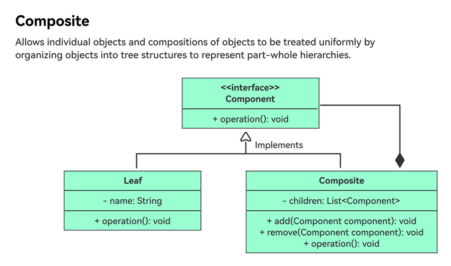
组合模式(Composite Pattern) 是一种结构型设计模式,它允许你将对象组合成树形结构来表示”部分-整体”的层次结构。它使客户端能够统一地对待单个对象(叶节点)和对象组合(组合节点),通过通用接口简化代码。
核心概念:

  1. 组件(Component):定义叶节点和组合节点的通用接口。
  2. 叶节点(Leaf):表示单个对象(没有子节点)。
  3. 组合节点(Composite):管理子组件,为与子节点相关的操作(添加、删除和获取)实现组件接口。
  4. 客户端(Client):通过通用接口与组件交互,不区分叶节点和组合节点。
    UML 图:
    1
    2
    3
    4
    5
    6
    7
    8
    9
    10
    11
    12
    13
    14
    ┌──────────────┐  
    │ Component │
    ├──────────────┤
    │+ Operation() │
    └──────────────┘
    ▲
    │-----------------------|
    ┌──────────────┐ ┌──────────────┐
    │ Leaf │ │ Composite │
    ├──────────────┤ ├──────────────┤
    │+ Operation() │ │+ Add() │
    │ │ │+ Remove() │
    │ │ │+ GetChild() │
    └──────────────┘ └──────────────┘
    使用案例:包含目录(组合节点)和文件(叶节点)的文件系统。
    1
    2
    3
    4
    5
    6
    7
    8
    9
    10
    11
    12
    13
    14
    15
    16
    17
    18
    19
    20
    21
    22
    23
    24
    25
    26
    27
    28
    29
    30
    31
    32
    33
    34
    35
    36
    37
    38
    39
    40
    41
    42
    43
    44
    45
    46
    47
    48
    49
    50
    51
    52
    53
    54
    55
    56
    57
    58
    59
    60
    61
    62
    63
    64
    65
    66
    67
    68
    69
    70
    71
    72
    73
    74
    75
    76
    77
    78
    79
    80
    81
    82
    //1. Define the Component Interface
    public abstract class FileSystemComponent
    {
    public abstract void Display(int depth);
    public virtual void Add(FileSystemComponent component)
    {
    throw new NotSupportedException("Leaf nodes cannot have children.");
    }
    public virtual void Remove(FileSystemComponent component)
    {
    throw new NotSupportedException("Leaf nodes cannot have children.");
    }
    }
    //2. Implement Leaf Nodes (Files)
    public class File : FileSystemComponent
    {
    private string _name;

    public File(string name)
    {
    _name = name;
    }

    public override void Display(int depth)
    {
    Console.WriteLine(new string('-', depth) + _name);
    }
    }
    //3. Implement Composite Nodes (Directories)
    public class Directory : FileSystemComponent
    {
    private string _name;
    private List<FileSystemComponent> _children = new List<FileSystemComponent>();

    public Directory(string name)
    {
    _name = name;
    }

    public override void Display(int depth)
    {
    Console.WriteLine(new string('-', depth) + _name);
    foreach (var child in _children)
    {
    child.Display(depth + 2); // Indent children
    }
    }

    public override void Add(FileSystemComponent component)
    {
    _children.Add(component);
    }

    public override void Remove(FileSystemComponent component)
    {
    _children.Remove(component);
    }
    }
    //4. Client Code
    public class Client
    {
    public void BuildFileSystem()
    {
    // Root directory (composite)
    Directory root = new Directory("Root");

    // Subdirectories and files (composites and leaves)
    Directory docs = new Directory("Documents");
    docs.Add(new File("Report.txt"));
    docs.Add(new File("Budget.xlsx"));

    Directory pics = new Directory("Pictures");
    pics.Add(new File("Vacation.jpg"));

    root.Add(docs);
    root.Add(pics);
    root.Add(new File("ReadMe.md"));

    // Display the file system tree
    root.Display(0);
    }
    }
    输出:
    1
    2
    3
    4
    5
    6
    7
    Root  
    --Documents
    ----Report.txt
    ----Budget.xlsx
    --Pictures
    ----Vacation.jpg
    --ReadMe.md
    使用场景:
  • 文件系统:目录(组合节点)和文件(叶节点)。
  • GUI 工具包:容器(例如面板)和控件(例如按钮)。
  • 组织结构图:部门(组合节点)和员工(叶节点)。
  • 树形数据结构:XML/JSON 解析、语法树。

装饰器模式

pic
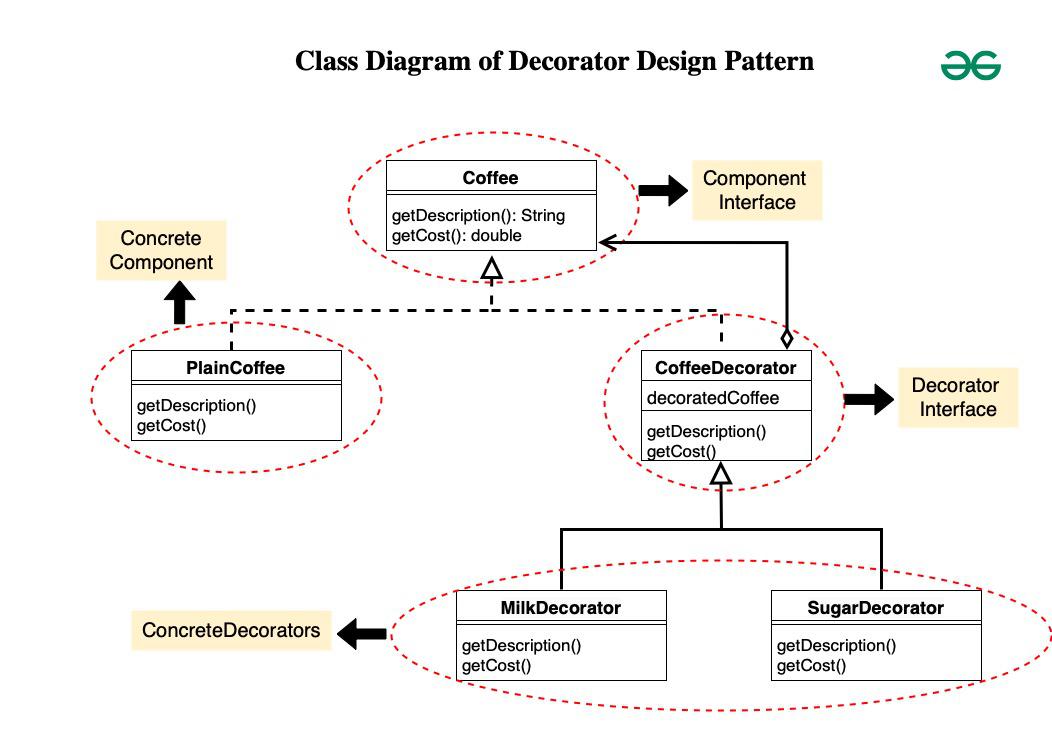
装饰器模式(Decorator Pattern) 是一种结构型设计模式,它允许你通过将对象放入特殊的包装类中,动态地为对象添加新行为。它提供了子类化的灵活替代方案来扩展功能,允许在运行时添加或移除行为。
核心概念:

  1. 组件(Component):定义可以被装饰的对象的通用接口。
  2. 具体组件(Concrete Component):实现组件的基础功能。
  3. 装饰器(Decorator):持有对组件的引用并实现组件接口。
  4. 具体装饰器(Concrete Decorators):通过重写方法为组件添加特定行为。

使用案例:咖啡店中,饮品(组件)可以通过添加剂(装饰器)进行装饰。

1
2
3
4
5
6
7
8
9
10
11
12
13
14
15
16
17
18
19
20
21
22
23
24
25
26
27
28
29
30
31
32
33
34
35
36
37
38
39
40
41
42
43
44
45
46
47
48
49
50
51
52
53
54
55
56
57
58
59
60
61
62
63
64
65
66
67
68
69
70
71
72
73
74
75
76
77
//1. Define the Component Interface
public interface ICoffee
{
string GetDescription();
double GetCost();
}

//2. Implement Concrete Components
public class Espresso : ICoffee
{
public string GetDescription() => "Espresso";
public double GetCost() => 1.99;
}

public class DarkRoast : ICoffee
{
public string GetDescription() => "Dark Roast Coffee";
public double GetCost() => 1.89;
}

//3. Define the Decorator Base Class
public abstract class CondimentDecorator : ICoffee
{
protected ICoffee _coffee;

public CondimentDecorator(ICoffee coffee)
{
_coffee = coffee;
}

public abstract string GetDescription();
public abstract double GetCost();
}
//4. Implement Concrete Decorators
public class Mocha : CondimentDecorator
{
public Mocha(ICoffee coffee) : base(coffee) { }

public override string GetDescription()
{
return _coffee.GetDescription() + ", Mocha";
}

public override double GetCost()
{
return _coffee.GetCost() + 0.20;
}
}

public class Whip : CondimentDecorator
{
public Whip(ICoffee coffee) : base(coffee) { }

public override string GetDescription()
{
return _coffee.GetDescription() + ", Whip";
}

public override double GetCost()
{
return _coffee.GetCost() + 0.10;
}
}
//5. Client Code
public class Client
{
public void OrderCoffee()
{
// Base coffee
ICoffee coffee = new Espresso();
Console.WriteLine($"{coffee.GetDescription()} = ${coffee.GetCost()}");

// Decorated coffee
ICoffee decoratedCoffee = new Whip(new Mocha(new Mocha(coffee)));
Console.WriteLine($"{decoratedCoffee.GetDescription()} = ${decoratedCoffee.GetCost()}");
}
}

输出:

1
2
Espresso = $1.99  
Espresso, Mocha, Mocha, Whip = $2.39

使用场景:
GUI 组件:为控件添加边框、滚动条或提示框。
I/O 流:使用缓冲、加密或压缩来包装流。
日志记录:为日志消息添加时间戳、元数据或格式化。
安全性:为请求添加身份验证或授权层。

外观模式
pic
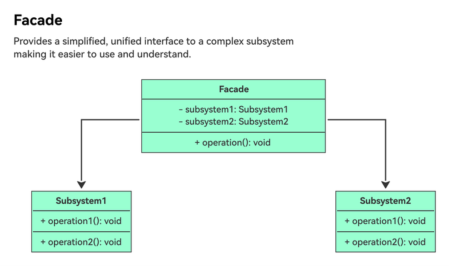
外观模式(Facade Pattern) 是一种结构型设计模式,它为复杂的类、库或 API 系统提供一个简化的接口。它隐藏了底层的复杂性,只暴露高层功能,使系统更易于使用和维护。该模式通常用于将客户端与复杂的子系统解耦。
核心概念:

  1. 外观(Facade):为子系统提供简化的接口。
  2. 子系统类(Subsystem Classes):实现复杂的功能,但不感知外观的存在。
  3. 客户端(Client):与外观交互,而不是直接访问子系统类。
    UML 图
    1
    2
    3
    4
    5
    6
    7
    8
    9
    10
    11
    12
    13
    ┌──────────────┐       ┌──────────────────┐  
    │ Client │──────►│ Facade │
    └──────────────┘ ├──────────────────┤
    │+ SimpleOperation()│
    └──────────────────┘
    ▲
    │ uses
    │
    ┌──────────────┐ ┌──────────────┐ ┌──────────────┐
    │ SubsystemA │ │ SubsystemB │ │ SubsystemC │
    ├──────────────┤ ├──────────────┤ ├──────────────┤
    │+ OperationA()│ │+ OperationB()│ │+ OperationC()│
    └──────────────┘ └──────────────┘ └──────────────┘
    使用案例:包含多个组件(功放、DVD 播放器、投影仪)的家庭影院系统。
    1
    2
    3
    4
    5
    6
    7
    8
    9
    10
    11
    12
    13
    14
    15
    16
    17
    18
    19
    20
    21
    22
    23
    24
    25
    26
    27
    28
    29
    30
    31
    32
    33
    34
    35
    36
    37
    38
    39
    40
    41
    42
    43
    44
    45
    46
    47
    48
    49
    50
    51
    52
    53
    54
    55
    56
    57
    58
    59
    60
    61
    62
    63
    64
    65
    66
    67
    68
    69
    70
    71
    72
    73
    74
    75
    76
    1. Define Subsystem Classes
    // Subsystem: Amplifier
    public class Amplifier
    {
    public void On() => Console.WriteLine("Amplifier on");
    public void Off() => Console.WriteLine("Amplifier off");
    public void SetVolume(int level) => Console.WriteLine($"Amplifier volume set to {level}");
    }

    // Subsystem: DVD Player
    public class DvdPlayer
    {
    public void On() => Console.WriteLine("DVD Player on");
    public void Off() => Console.WriteLine("DVD Player off");
    public void Play(string movie) => Console.WriteLine($"DVD Player playing '{movie}'");
    }

    // Subsystem: Projector
    public class Projector
    {
    public void On() => Console.WriteLine("Projector on");
    public void Off() => Console.WriteLine("Projector off");
    public void SetInput(DvdPlayer dvd) => Console.WriteLine("Projector input set to DVD");
    }
    2. Create the Facade
    //public class HomeTheaterFacade
    {
    private readonly Amplifier _amp;
    private readonly DvdPlayer _dvd;
    private readonly Projector _projector;

    public HomeTheaterFacade(Amplifier amp, DvdPlayer dvd, Projector projector)
    {
    _amp = amp;
    _dvd = dvd;
    _projector = projector;
    }

    public void WatchMovie(string movie)
    {
    Console.WriteLine("Get ready to watch a movie...");
    _amp.On();
    _projector.On();
    _projector.SetInput(_dvd);
    _dvd.On();
    _dvd.Play(movie);
    _amp.SetVolume(10);
    }

    public void EndMovie()
    {
    Console.WriteLine("Shutting movie theater down...");
    _dvd.Off();
    _projector.Off();
    _amp.Off();
    }
    }
    //3. Client Code
    public class Client
    {
    public void UseHomeTheater()
    {
    // Initialize subsystems
    var amp = new Amplifier();
    var dvd = new DvdPlayer();
    var projector = new Projector();

    // Create facade
    var homeTheater = new HomeTheaterFacade(amp, dvd, projector);

    // Simplified interface
    homeTheater.WatchMovie("Avatar");
    Console.WriteLine("\n");
    homeTheater.EndMovie();
    }
    }
    输出:
    1
    2
    3
    4
    5
    6
    7
    8
    9
    10
    11
    12
    Get ready to watch a movie...  
    Amplifier on
    Projector on
    Projector input set to DVD
    DVD Player on
    DVD Player playing 'Avatar'
    Amplifier volume set to 10

    Shutting movie theater down...
    DVD Player off
    Projector off
    Amplifier off
    使用场景:
  • 复杂 API:简化第三方库(例如云存储 API)。
  • 遗留系统:为过时的代码提供现代化的接口。
  • 跨层通信:桥接应用程序中的不同层(例如 UI 和业务逻辑)。
  • 测试:创建外观以在单元测试中模拟复杂的子系统。

享元模式

pic
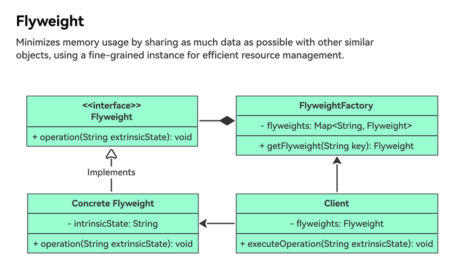
享元模式(Flyweight Pattern) 是一种结构型设计模式,它通过在相似对象之间尽可能多地共享数据来最小化内存使用。它通过将内在(共享)状态与外在(特定于上下文)状态分离来实现,使对象可以在不同的上下文中被复用。该模式对于在需要处理大量相似对象时优化内存特别有用。
核心概念:

  1. 享元(Flyweight):定义共享对象的接口,管理内在状态。
  2. 具体享元(Concrete Flyweight):实现享元接口并存储内在状态。
  3. 享元工厂(Flyweight Factory):管理享元对象池,确保它们被共享和复用。
  4. 客户端(Client):持有外在状态,并使用享元工厂获取享元实例。

享元设计模式完整代码:

1
2
3
4
5
6
7
8
9
10
11
12
13
14
15
16
17
18
19
20
21
22
23
24
25
26
27
28
29
30
31
32
33
34
35
36
37
38
39
40
41
42
43
44
45
46
47
48
49
50
51
52
53
54
55
56
57
58
59
60
61
62
63
64
65
66
67
68
69
70
71
72
73
74
75
76
77
78
79
80
81
82
83
84
85
86
import java.util.HashMap;
import java.util.Map;
// Flyweight interface
interface Icon {
void draw(int x, int y); // Method to draw the icon at given coordinates
}

// Concrete Flyweight class representing a File Icon
class FileIcon implements Icon {
private String type; // Intrinsic state: type of file icon
private String imageName; // Intrinsic state: image name specific to the file icon

public FileIcon(String type, String imageName) {
this.type = type;
this.imageName = imageName;
}

@Override
public void draw(int x, int y) {
// Simulated logic to load and draw image
System.out.println("Drawing " + type + " icon with image " + imageName + " at position (" + x + ", " + y + ")");
}
}

// Concrete Flyweight class representing a Folder Icon
class FolderIcon implements Icon {
private String color; // Intrinsic state: color of the folder icon
private String imageName; // Intrinsic state: image name specific to the folder icon

public FolderIcon(String color, String imageName) {
this.color = color;
this.imageName = imageName;
}

@Override
public void draw(int x, int y) {
// Simulated logic to load and draw image
System.out.println("Drawing folder icon with color " + color + " and image " + imageName + " at position (" + x + ", " + y + ")");
}
}

// Flyweight factory to manage creation and retrieval of flyweight objects
class IconFactory {
private Map<String, Icon> iconCache = new HashMap<>();

public Icon getIcon(String key) {
// Check if the icon already exists in the cache
if (iconCache.containsKey(key)) {
return iconCache.get(key);
} else {
// Create a new icon based on the key (type of icon)
Icon icon;
if (key.equals("file")) {
icon = new FileIcon("document", "document.png");
} else if (key.equals("folder")) {
icon = new FolderIcon("blue", "folder.png");
} else {
throw new IllegalArgumentException("Unsupported icon type: " + key);
}
// Store the created icon in the cache
iconCache.put(key, icon);
return icon;
}
}
}

// Client code to use the flyweight objects (icons)
public class Client {
public static void main(String[] args) {
IconFactory iconFactory = new IconFactory();

// Draw file icons at different positions
Icon fileIcon1 = iconFactory.getIcon("file");
fileIcon1.draw(100, 100);

Icon fileIcon2 = iconFactory.getIcon("file");
fileIcon2.draw(150, 150);

// Draw folder icons at different positions
Icon folderIcon1 = iconFactory.getIcon("folder");
folderIcon1.draw(200, 200);

Icon folderIcon2 = iconFactory.getIcon("folder");
folderIcon2.draw(250, 250);
}
}

使用场景:

  • 图形系统:复用共享的纹理、精灵或字形。
  • 游戏开发:共享通用资源(例如地形瓦片、敌人模型)。
  • 文档编辑器:复用字符、字体或格式化样式。
  • 数据库连接:池化并复用连接对象。

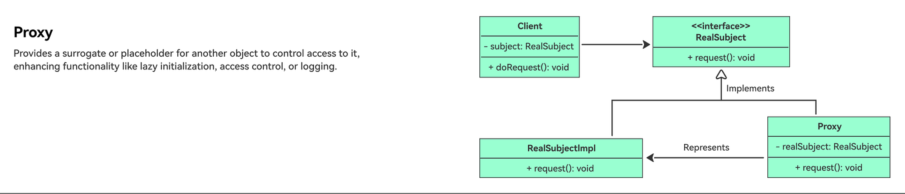
代理模式

pic
代理模式(Proxy Pattern) 是一种结构型设计模式,它为另一个对象提供一个替代或占位符来控制对它的访问。代理充当客户端和真实对象之间的中介,允许在不改变真实对象接口的情况下添加额外功能(例如延迟加载、访问控制、日志记录)。
核心概念

  1. 主题(Subject):定义 RealSubject 和 Proxy 的通用接口。
  2. 真实主题(RealSubject):实现主题接口,包含实际的业务逻辑。
  3. 代理(Proxy):持有对 RealSubject 的引用并控制对它的访问。
  4. 客户端(Client):像对待 RealSubject 一样与 Proxy 交互。
    UML 图:
    1
    2
    3
    4
    5
    6
    7
    8
    9
    10
    11
    12
    13
    ┌──────────────┐       ┌──────────────┐       ┌──────────────┐  
    │ Subject │ │ Proxy │ │ RealSubject │
    ├──────────────┤ ├──────────────┤ ├──────────────┤
    │+ Request() │ │- realSubject │ │+ Request() │
    └──────────────┘ │+ Request() │ └──────────────┘
    ▲ └──────────────┘ ▲
    │ ▲ │
    │ │ │
    └─────────────────────┼───────────────────── ┘
    │
    ┌───────────────────────────────────────────────────────┐
    │ Client │
    └───────────────────────────────────────────────────────┘
    使用案例:具有延迟初始化的高分辨率图像加载器。
    1
    2
    3
    4
    5
    6
    7
    8
    9
    10
    11
    12
    13
    14
    15
    16
    17
    18
    19
    20
    21
    22
    23
    24
    25
    26
    27
    28
    29
    30
    31
    32
    33
    34
    35
    36
    37
    38
    39
    40
    41
    42
    43
    44
    45
    46
    47
    48
    49
    50
    51
    52
    53
    54
    55
    56
    57
    58
    59
    60
    61
    //1. Define the Subject Interface
    public interface IImage
    {
    void Display();
    }
    //2. Implement the RealSubject
    public class RealImage : IImage
    {
    private readonly string _fileName;

    public RealImage(string fileName)
    {
    _fileName = fileName;
    LoadFromDisk(_fileName);
    }

    public void Display()
    {
    Console.WriteLine($"Displaying {_fileName}");
    }

    private void LoadFromDisk(string fileName)
    {
    Console.WriteLine($"Loading {fileName}");
    }
    }
    //3. Implement the Proxy
    public class ProxyImage : IImage
    {
    private RealImage _realImage;
    private readonly string _fileName;

    public ProxyImage(string fileName)
    {
    _fileName = fileName;
    }

    public void Display()
    {
    if (_realImage == null)
    {
    _realImage = new RealImage(_fileName);
    }
    _realImage.Display();
    }
    }
    //4. Client Code
    public class Client
    {
    public void UseImage()
    {
    IImage image = new ProxyImage("high_res.jpg");

    // Image is not loaded until Display() is called
    Console.WriteLine("Calling Display() for the first time:");
    image.Display();

    Console.WriteLine("\nCalling Display() again:");
    image.Display();
    }
    }
    输出:
    1
    2
    3
    4
    5
    6
    Calling Display() for the first time:  
    Loading high_res.jpg
    Displaying high_res.jpg

    Calling Display() again:
    Displaying high_res.jpg
    使用场景:
  • 远程代理(Remote Proxy):隐藏网络通信细节(例如 .NET Remoting)。
  • 虚拟代理(Virtual Proxy):延迟昂贵操作(例如延迟加载图像)。
  • 保护代理(Protection Proxy):基于权限控制访问(例如用户角色)。
  • 智能引用(Smart Reference):在访问对象时添加额外行为(例如引用计数)。

行为型模式

观察者模式

观察者模式(Observer Pattern) 是一种行为型设计模式,它在对象之间建立一对多的依赖关系。当一个对象(主题)状态改变时,所有依赖它的对象(观察者)都会收到通知并自动更新。该模式非常适合实现事件驱动系统,其中多个组件需要对状态变化做出反应。
核心概念:

  1. 主题(Subject):管理观察者列表,并在状态变化时通知它们。
  2. 观察者(Observer):定义接收主题更新的接口。
  3. 具体主题(Concrete Subject):实现主题接口,存储观察者感兴趣的状态。
  4. 具体观察者(Concrete Observer):实现观察者接口,并维护对具体主题的引用。
1
2
3
4
5
6
7
8
9
10
11
12
13
14
15
16
17
18
19
20
21
22
23
24
25
26
27
28
29
30
31
32
33
34
35
36
37
38
39
40
41
42
43
44
45
46
47
48
49
50
51
52
53
54
55
56
57
58
59
60
61
62
63
64
65
66
67
68
69
70
71
72
73
74
75
76
77
78
79
80
81
82
83
84
85
86
87
88
89
90
91
92
import java.util.ArrayList;
import java.util.List;

// Observer Interface
interface Observer {
void update(String weather);
}

// Subject Interface
interface Subject {
void addObserver(Observer observer);
void removeObserver(Observer observer);
void notifyObservers();
}

// ConcreteSubject Class
class WeatherStation implements Subject {
private List<Observer> observers = new ArrayList<>();
private String weather;

@Override
public void addObserver(Observer observer) {
observers.add(observer);
}

@Override
public void removeObserver(Observer observer) {
observers.remove(observer);
}

@Override
public void notifyObservers() {
for (Observer observer : observers) {
observer.update(weather);
}
}

public void setWeather(String newWeather) {
this.weather = newWeather;
notifyObservers();
}
}

// ConcreteObserver Class
class PhoneDisplay implements Observer {
private String weather;

@Override
public void update(String weather) {
this.weather = weather;
display();
}

private void display() {
System.out.println("Phone Display: Weather updated - " + weather);
}
}

// ConcreteObserver Class
class TVDisplay implements Observer {
private String weather;

@Override
public void update(String weather) {
this.weather = weather;
display();
}

private void display() {
System.out.println("TV Display: Weather updated - " + weather);
}
}

// Usage Class
public class WeatherApp {
public static void main(String[] args) {
WeatherStation weatherStation = new WeatherStation();

Observer phoneDisplay = new PhoneDisplay();
Observer tvDisplay = new TVDisplay();

weatherStation.addObserver(phoneDisplay);
weatherStation.addObserver(tvDisplay);

// Simulating weather change
weatherStation.setWeather("Sunny");

// Output:
// Phone Display: Weather updated - Sunny
// TV Display: Weather updated - Sunny
}
}

输出:

1
2
Phone Display: Weather updated - Sunny
TV Display: Weather updated - Sunny

实际案例:

  • Java 事件监听器:Swing 组件中的 ActionListener。
  • .NET 事件:System.EventHandler 和事件订阅者。
  • RxJava/Rx.NET:Reactive Extensions 使用观察者模式处理异步流。

迭代器模式
pic
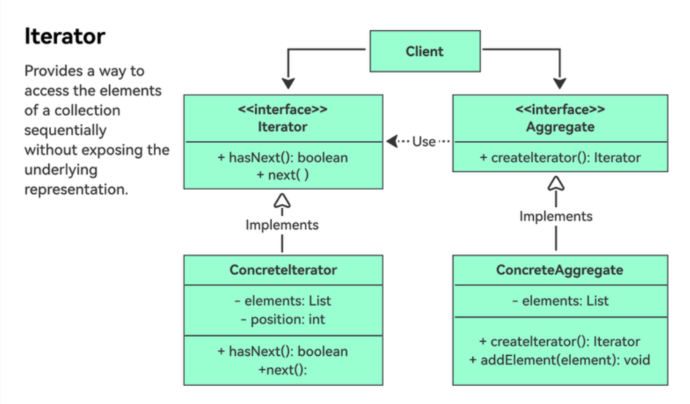
迭代器模式(Iterator Pattern) 是一种行为型设计模式,它提供了一种顺序访问聚合对象(例如集合)元素的方法,而无需暴露其底层表示。它将遍历逻辑与集合解耦,允许不同的遍历算法或同时进行多次遍历。
核心概念:

  1. 迭代器(Iterator):定义访问和遍历元素的接口。
  2. 具体迭代器(Concrete Iterator):实现迭代器接口,跟踪集合中的当前位置。
  3. 聚合(Aggregate):定义创建迭代器的接口。
  4. 具体聚合(Concrete Aggregate):实现聚合接口以返回具体迭代器。
    使用案例:带有正向迭代器的自定义集合(名称仓库)。
    1
    2
    3
    4
    5
    6
    7
    8
    9
    10
    11
    12
    13
    14
    15
    16
    17
    18
    19
    20
    21
    22
    23
    24
    25
    26
    27
    28
    29
    30
    31
    32
    33
    34
    35
    36
    37
    38
    39
    40
    41
    42
    43
    44
    45
    46
    47
    48
    49
    50
    51
    52
    53
    54
    55
    56
    57
    58
    59
    60
    61
    //1. Define the Iterator Interface
    public interface IIterator<T>
    {
    bool HasNext();
    T Next();
    }
    //2. Define the Aggregate Interface
    public interface IAggregate<T>
    {
    IIterator<T> CreateIterator();
    }
    //3. Implement the Concrete Iterator
    public class NameIterator : IIterator<string>
    {
    private readonly string[] _names;
    private int _position = 0;

    public NameIterator(string[] names)
    {
    _names = names;
    }

    public bool HasNext()
    {
    return _position < _names.Length && _names[_position] != null;
    }

    public string Next()
    {
    if (HasNext())
    {
    return _names[_position++];
    }
    return null;
    }
    }
    //4. Implement the Concrete Aggregate
    public class NameRepository : IAggregate<string>
    {
    private readonly string[] _names = { "Alice", "Bob", "Charlie", "David" };

    public IIterator<string> CreateIterator()
    {
    return new NameIterator(_names);
    }
    }
    //5. Client Code
    public class Client
    {
    public void UseIterator()
    {
    IAggregate<string> repository = new NameRepository();
    IIterator<string> iterator = repository.CreateIterator();

    Console.WriteLine("Names:");
    while (iterator.HasNext())
    {
    Console.WriteLine(iterator.Next());
    }
    }
    }
    输出:
    1
    2
    3
    4
    5
    Names:  
    Alice
    Bob
    Charlie
    David
    使用场景:
  • 自定义集合:遍历非标准数据结构(例如树、图)。
  • 数据库结果:在不暴露底层数据的情况下迭代查询结果。
  • 文件系统导航:遍历目录和文件。
  • 并行处理:将遍历任务拆分到多个线程。

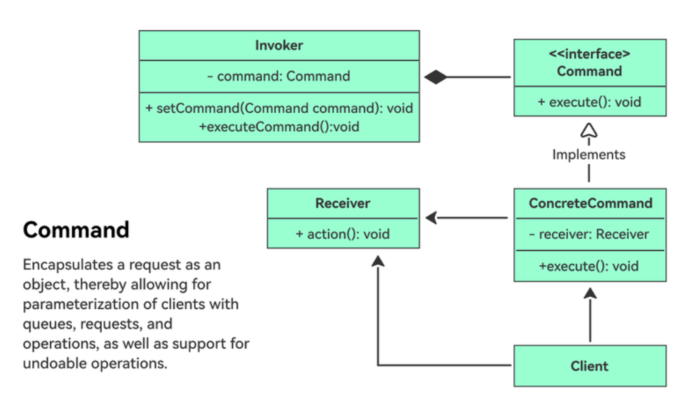
命令模式

pic
命令模式(Command Pattern) 是一种行为型设计模式,它将请求转化为一个独立的对象,其中包含有关请求的所有信息。这将发送者(调用者)与接收者(执行者)解耦,允许请求被参数化、排队、记录或撤销。
核心概念:

  1. 命令(Command):定义执行操作的接口。
  2. 具体命令(Concrete Command):实现命令接口,将接收者与操作绑定。
  3. 调用者(Invoker):要求命令执行请求。
  4. 接收者(Receiver):知道如何执行与命令关联的操作。
  5. 客户端(Client):创建具体命令并设置其接收者。
    使用案例:一个遥控器(调用者)可以使用命令来开/关一盏灯(接收者)。
    1
    2
    3
    4
    5
    6
    7
    8
    9
    10
    11
    12
    13
    14
    15
    16
    17
    18
    19
    20
    21
    22
    23
    24
    25
    26
    27
    28
    29
    30
    31
    32
    33
    34
    35
    36
    37
    38
    39
    40
    41
    42
    43
    44
    45
    46
    47
    48
    49
    50
    51
    52
    53
    54
    55
    56
    57
    58
    59
    60
    61
    62
    63
    64
    65
    66
    67
    68
    69
    70
    71
    72
    73
    74
    75
    76
    77
    78
    79
    80
    81
    82
    83
    84
    85
    86
    //1. Define the Command Interface
    public interface ICommand
    {
    void Execute();
    void Undo(); // Optional for undo functionality
    }
    //2. Implement Concrete Commands
    // Light On Command
    public class LightOnCommand : ICommand
    {
    private readonly Light _light;

    public LightOnCommand(Light light)
    {
    _light = light;
    }

    public void Execute() => _light.TurnOn();
    public void Undo() => _light.TurnOff();
    }

    // Light Off Command
    public class LightOffCommand : ICommand
    {
    private readonly Light _light;

    public LightOffCommand(Light light)
    {
    _light = light;
    }

    public void Execute() => _light.TurnOff();
    public void Undo() => _light.TurnOn();
    }
    //3. Define the Receiver
    public class Light
    {
    public void TurnOn() => Console.WriteLine("Light is on");
    public void TurnOff() => Console.WriteLine("Light is off");
    }
    //4. Implement the Invoker
    public class RemoteControl
    {
    private ICommand _command;

    public void SetCommand(ICommand command)
    {
    _command = command;
    }

    public void PressButton()
    {
    _command.Execute();
    }

    public void PressUndoButton()
    {
    _command.Undo();
    }
    }
    //5. Client Code
    public class Client
    {
    public void UseRemoteControl()
    {
    // Create receiver
    Light light = new Light();

    // Create commands
    ICommand lightOn = new LightOnCommand(light);
    ICommand lightOff = new LightOffCommand(light);

    // Create invoker
    RemoteControl remote = new RemoteControl();

    // Use invoker to execute commands
    remote.SetCommand(lightOn);
    remote.PressButton(); // Output: Light is on

    remote.SetCommand(lightOff);
    remote.PressButton(); // Output: Light is off

    // Undo last command
    remote.PressUndoButton(); // Output: Light is on
    }
    }
    使用场景:
  • GUI 按钮:将按钮点击映射到特定操作(例如”保存”命令)。
  • 撤销/重做系统:在应用中跟踪和反转用户操作。
  • 事务管理:将命令分组为原子操作。
  • 网络通信:通过网络发送命令(例如远程过程调用)。

实际案例:

  • Java 线程池:Runnable 和 Callable 接口充当命令。
  • .NET 委托:将方法调用封装为对象。
  • GUI 框架:Action 类(例如 Java 中的 javax.swing.Action)。

策略模式

pic
策略模式(Strategy Pattern) 是一种行为型设计模式,它定义了一系列算法,将每个算法封装起来,并使它们可以互换。它让算法独立于使用它的客户端而变化,提高了灵活性和可维护性。
核心概念:

  1. 策略(Strategy):定义所有具体算法的通用接口。
  2. 具体策略(Concrete Strategies):使用特定算法实现策略接口。
  3. 上下文(Context):持有对策略的引用,并使用它来执行任务。
  4. 客户端(Client):为上下文配置特定的策略。

使用案例:支持多种支付方式(信用卡、PayPal)的支付处理器。

1
2
3
4
5
6
7
8
9
10
11
12
13
14
15
16
17
18
19
20
21
22
23
24
25
26
27
28
29
30
31
32
33
34
35
36
37
38
39
40
41
42
43
44
45
46
47
48
49
50
51
52
53
54
55
56
57
58
59
60
61
62
63
64
65
66
67
68
69
70
71
72
//1. Define the Strategy Interface
public interface IPaymentStrategy
{
void Pay(double amount);
}
//2. Implement Concrete Strategies
// Credit Card Payment
public class CreditCardStrategy : IPaymentStrategy
{
private readonly string _cardNumber;
private readonly string _expiryDate;
private readonly string _cvv;

public CreditCardStrategy(string cardNumber, string expiryDate, string cvv)
{
_cardNumber = cardNumber;
_expiryDate = expiryDate;
_cvv = cvv;
}

public void Pay(double amount)
{
Console.WriteLine($"Paid ${amount} via Credit Card ({_cardNumber.Substring(_cardNumber.Length - 4)})");
}
}

// PayPal Payment
public class PayPalStrategy : IPaymentStrategy
{
private readonly string _email;

public PayPalStrategy(string email)
{
_email = email;
}

public void Pay(double amount)
{
Console.WriteLine($"Paid ${amount} via PayPal ({_email})");
}
}
//3. Implement the Context
public class ShoppingCart
{
private IPaymentStrategy _paymentStrategy;

public void SetPaymentStrategy(IPaymentStrategy strategy)
{
_paymentStrategy = strategy;
}

public void Checkout(double amount)
{
_paymentStrategy.Pay(amount);
}
}
//4. Client Code
public class Client
{
public void ProcessPayment()
{
var cart = new ShoppingCart();

// Pay with credit card
cart.SetPaymentStrategy(new CreditCardStrategy("1234-5678-9012-3456", "12/25", "123"));
cart.Checkout(100.50);

// Switch to PayPal
cart.SetPaymentStrategy(new PayPalStrategy("user@example.com"));
cart.Checkout(50.25);
}
}

输出:

1
2
3
plaintext
Paid $100.5 via Credit Card (3456)
Paid $50.25 via PayPal (user@example.com)

使用场景:

  • 排序算法:在快速排序、归并排序或冒泡排序之间动态选择。
  • 加密/压缩:在不同的算法之间切换(例如 AES 与 RSA)。
  • 支付处理:支持多种支付方式(信用卡、PayPal、Apple Pay)。
  • 游戏 AI:为角色实现不同的行为(进攻、防守、被动)。

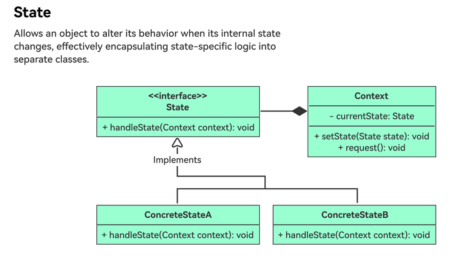
状态模式

pic
状态模式(State Pattern) 是一种行为型设计模式,它允许对象在内部状态改变时改变其行为。对象看起来像是改变了它的类,因为该模式将特定于状态的行为封装到独立的状态类中,并委托给当前状态。这简化了复杂的依赖于状态的逻辑,并遵循开闭原则。
核心概念:

  1. 上下文(Context):维护一个具体状态的实例,表示其当前状态。
  2. 状态接口(State Interface):定义所有具体状态的通用接口。
  3. 具体状态(Concrete States):实现状态接口,提供特定于某个状态的行为。
  4. 状态转换(State Transitions):由状态类本身或上下文管理,取决于具体实现。

使用案例:用户与自动售货机的交互会触发状态转换。例如,当用户投入钱币时,自动售货机从”就绪状态(ReadyState)”转换到”支付处理中状态(PaymentPendingState)”。

1
2
3
4
5
6
7
8
9
10
11
12
13
14
15
16
17
18
19
20
21
22
23
24
25
26
27
28
29
30
31
32
33
34
35
36
37
38
39
40
41
42
43
44
45
46
47
48
49
50
51
52
53
54
55
56
57
58
59
60
61
62
63
64
65
66
67
68
69
70
71
72
73
74
interface VendingMachineState {
void handleRequest();
}

class ReadyState implements VendingMachineState {
@Override
public void handleRequest() {
System.out.println("Ready state: Please select a product.");
}
}

class ProductSelectedState implements VendingMachineState {
@Override
public void handleRequest() {
System.out.println("Product selected state: Processing payment.");
}
}

class PaymentPendingState implements VendingMachineState {
@Override
public void handleRequest() {
System.out.println("Payment pending state: Dispensing product.");
}
}

class OutOfStockState implements VendingMachineState {
@Override
public void handleRequest() {
System.out.println("Out of stock state: Product unavailable. Please select another product.");
}
}

class VendingMachineContext {
private VendingMachineState state;

public void setState(VendingMachineState state) {
this.state = state;
}

public void request() {
state.handleRequest();
}
}

public class Main {
public static void main(String[] args) {
// Create context
VendingMachineContext vendingMachine = new VendingMachineContext();

// Set initial state
vendingMachine.setState(new ReadyState());

// Request state change
vendingMachine.request();

// Change state
vendingMachine.setState(new ProductSelectedState());

// Request state change
vendingMachine.request();

// Change state
vendingMachine.setState(new PaymentPendingState());

// Request state change
vendingMachine.request();

// Change state
vendingMachine.setState(new OutOfStockState());

// Request state change
vendingMachine.request();
}
}

输出:

1
2
3
4
Ready state: Please select a product.
Product selected state: Processing payment.
Payment pending state: Dispensing product.
Out of stock state: Product unavailable. Please select another product.

何时使用状态设计模式:
状态设计模式在以下场景中非常有益:当你的对象的行为需要根据其内部状态动态变化时。以下是一些关键指标:

  • 多种状态对应不同行为:如果你的对象存在于多种状态中(例如开/关、打开/关闭、启动/停止),并且每种状态要求独特的行为,状态模式可以有效地封装这些逻辑。
  • 复杂的条件逻辑:当对象中的条件语句(if-else 或 switch-case)变得冗长且复杂时,状态模式有助于将特定于状态的逻辑组织并分离到独立的类中,提高可读性和可维护性。
  • 频繁的状态变化:如果你的对象在不同状态之间频繁切换,状态模式提供了管理这些转换及其关联操作的清晰机制。
  • 轻松添加新状态:如果你预计将来需要添加新状态,状态模式可以通过创建新的状态类来实现,而不影响现有的状态类。

Author: Alex

Article Link: https://bodysuperman.github.io/zh-CN/2025/04/19/Design-Patterns/

License: This article is licensed under CC BY-NC-SA 4.0. Please credit the original author and include the source link when reposting.