CSS3 简介: 什么是 CSS3? CSS3(层叠样式表第 3 版)是网页样式的最新标准。它控制 HTML 元素的视觉呈现,包括颜色、布局、动画和交互。与 HTML(定义结构)不同,CSS3 将样式与内容分离——使代码更易维护和灵活。
CSS3 的核心作用
样式增强 :自定义字体、颜色、边框和视觉效果。布局控制 :排列元素、创建响应式设计、管理间距。交互动画 :添加过渡、悬停效果和动态变化。
CSS 按位置分类
行内样式 (最不推荐)
1 <p style ="color: red; font-size: 14px;" > Text content</p >
样式写在 HTML 标签内部
仅控制当前标签
在特殊场景下使用
内部样式 (适用于单页面)
1 2 3 4 5 <head > <style > div { font-size : 18px ; color : red; } </style > </head >
写在 部分
控制当前页面上的所有元素
将结构与样式分离
外部样式 (最推荐)
1 <link rel ="stylesheet" href ="./css/index.css" >
CSS3 选择器:精准定位元素 选择器是用于定位 HTML 元素以应用样式的模式。它们是有效使用 CSS3 的基础。
基础选择器
选择器类型 语法 匹配范围 可复用性 示例
类型选择器
tagname
指定标签的所有元素
高(用于全局样式)
div { color: pink; }
类选择器
.classname
class 属性匹配的元素高(可复用)
.btn { padding: 10px; }
ID 选择器
#idname
id 唯一的元素
低(一次性使用)
#header { background: gray; }
通配符选择器
*
页面上的所有元素 全局
*
{ margin: 0; padding: 0; box-sizing: border-box;}
关系选择器 根据元素相对于其他元素的位置来定位:
后代选择器 :A B(A 的所有后代,包括嵌套层级)1 ul li { list-style: none; }
子代选择器 :A > B(仅 A 的直接子元素)1 div > p { color: green; }
相邻兄弟选择器 :A + B(紧跟在 A 后面的兄弟元素)+ p { font-weight: bold; } 1 2 3 4 5 6 7 8 9 10 11 12 13 14 15 ``` - **通用兄弟选择器**:`A ~ B`(A 之后的所有兄弟元素) ```h2 ~ p { line-height: 1.5; }``` ### 伪类与伪元素<a name="pse"></a> - **伪类**:定位元素状态(如悬停、聚焦) ```css /* Link States (LVHA order) */ a:link { color: blue; } /* Unvisited */ a:visited { color: purple; } /* Visited */ a:hover { color: red; } /* Mouse over */ a:active { color: green; } /* Being clicked */ /* User Interaction */ div:hover { background: pink; } input:focus { border-color: blue; }
结构性伪类 :按位置定位元素1 2 3 4 5 6 7 8 9 10 li :first-child { color : pink; }li :last-child { color : green; }li :nth-child (3 ) { color : blue; }li :nth-child (odd) { background : #f0f0f0 ; } li :nth-child (even) { background : #fff ; } li :nth-child (3 n) { color : red; } li :nth-child (n+2 ) { margin-top : 10px ; }
伪元素 :定位元素的特定部分1 2 3 4 5 6 7 8 9 10 11 12 13 14 ::selection { background : pink; color : white; }p ::first-line { font-weight : bold; }p ::first-letter { font-size : 2em ; }input ::placeholder { color : #999 ; }div ::before { content : "Start: " ; color : red; }div ::after { content : " - End" ; color : blue; }
属性选择器 根据属性值定位元素:
1 2 3 4 5 6 input [type="text" ] { padding : 8px ; }[class*="icon" ] { font-size : 18px ; }a [href^="https" ] { color : green; }
文本样式与排版 通过这些核心属性控制文本的外观和排列。
字体样式
属性 描述 常用值 示例
color
文本颜色
关键字、十六进制、RGB/RGBA
color: #333;
font-family
字体类型
系统字体、网络字体
font-family: “Microsoft YaHei”, sans-serif;
font-size
文本大小
px, em, remfont-size: 16px;
font-weight
文本粗细
normal (400), bold (700)
font-weight: 600;
font-style
文本风格
normal, italicfont-style: italic;
text-decoration
文本装饰
none, underline, line-throughtext-decoration: none;(去除链接下划线)
文本排版
属性 ** 描述**
常用值 示例
text-align水平对齐
left, center, right, justifytext-align: center;
text-indent首行缩进
em, pxtext-indent: 2em;(缩进 2 个字符)
letter-spacing字符间距
px(正值/负值)letter-spacing: 1px;
line-height行高
px、倍数line-height: 1.5;(1.5 倍字号)
font 简写 将多个字体属性合并为一条声明(顺序:style → weight → size/line-height → family):
1 2 3 body { font : normal 400 16px /1.5 "Helvetica Neue" , sans-serif; }
CSS 优先级(权重)
选择器类型 权重 示例
!important
∞(无穷大)
color: red !important;
行内样式
(1,0,0,0)
<div style="color: red">
ID 选择器
(0,1,0,0)
#header
类/属性/伪类
(0,0,1,0)
.nav, [type="text"], :hover
类型选择器/伪元素
(0,0,0,1)
div, ::before
通配符选择器
(0,0,0,0)
*
权重计算 :#nav .item a = 0,1,0,0 + 0,0,1,0 + 0,0,0,1 = 0,1,1,1
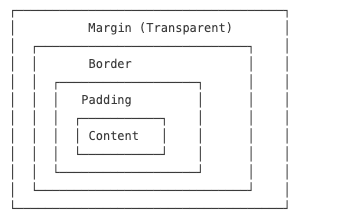
盒模型 盒模型组成 一个盒子由四部分组成(从内到外):
Content(内容) :实际内容(文本、图片)Padding(内边距) :内容与边框之间的空间Border(边框) :围绕内边距的线条Margin(外边距) :盒子与其他元素之间的空间
关键属性 Padding(内边距)
1 2 3 4 5 6 .box { padding : 10px 20px 10px 20px ; padding : 10px 20px ; padding : 10px ; }
Border(边框)
1 2 3 4 5 6 .box { border : 1px solid #ddd ; border-radius : 8px ; border-top : 2px dashed red; }
Margin(外边距)
1 2 3 4 5 .container { width : 1200px ; margin : 0 auto; }
box-sizing 默认情况下,width/height 仅作用于内容区域。使用 box-sizing 可以让 padding 和 border 包含在内:
1 2 3 4 * { box-sizing : border-box; }
外边距折叠与修复
兄弟折叠 :块级兄弟元素之间的垂直外边距会合并(只取较大的那个)父子折叠 :子元素的外边距会影响父元素,修复方法:1 2 3 4 5 .parent ::after { content : '' ; display : block; clear : both; }
CSS 背景 背景属性 1 2 3 4 5 6 7 8 9 10 11 12 13 14 15 16 17 18 19 20 21 22 23 24 div { background-color : #f0f0f0 ; background-image : url ('image.jpg' ); background-repeat : no-repeat; background-position : center center; background-size : cover; background-attachment : fixed; background : #f0f0f0 url ('image.jpg' ) no-repeat center center/cover fixed; }
背景渐变 1 2 3 4 5 6 7 8 9 10 11 12 13 14 15 16 17 18 div { background : linear-gradient (to right, #ff6b6b , #4ecdc4 ); background : linear-gradient (90deg , #ff6b6b 30% , #4ecdc4 70% ); } div { background : radial-gradient (circle, #ff9a9e , #fad0c4 ); } h1 { background : linear-gradient (to right, pink, red); -webkit-background-clip : text; background-clip : text; -webkit-text -fill -color : transparent; color : transparent;
盒阴影与过渡 盒阴影 1 2 3 4 5 6 7 8 9 10 11 12 13 14 15 16 div { box-shadow : 2px 2px 10px 0 rgba (0 ,0 ,0 ,0.3 ); box-shadow : 2px 4px rgba (0 ,0 ,0 ,0.1 ), 0 8px 16px rgba (0 ,0 ,0 ,0.1 ); box-shadow : inset 0 0 10px rgba (0 ,0 ,0 ,0.5 ); box-shadow : 0 0 0 5px rgba (255 ,0 ,0 ,0.5 ); }
过渡 1 2 3 4 5 6 7 8 9 10 11 12 13 14 15 16 17 18 19 20 21 22 div { transition : all 0.3s ease-in-out; transition : background-color 0.3s ease, transform 0.5s cubic-bezier (0.4 , 0 , 0.2 , 1 ), opacity 0.2s linear 0.1s ; transition-property : width, height; transition-duration : 0.3s , 0.5s ; transition-timing-function : ease-in, linear; transition-delay : 0.1s ; div :hover { background-color : pink; transform : scale (1.05 ); } }
文本样式 字体属性 1 2 3 4 5 6 7 8 9 10 11 12 13 14 15 16 17 18 19 20 21 22 23 24 25 26 27 28 29 30 31 32 33 34 35 p { color : #333 ; color : rgb (51 , 51 , 51 ); color : rgba (51 , 51 , 51 , 0.8 ); font-family : "Helvetica Neue" , Helvetica, Arial, sans-serif; font-size : 16px ; font-size : 1rem ; font-size : 1.2em ; font-style : normal; font-style : italic; font-style : oblique; font-weight : 400 ; font-weight : 700 ; font-weight : normal; font-weight : bold; text-decoration : none; text-decoration : underline; text-decoration : line-through; text-decoration : overline; font : italic 700 16px /1.5 "Helvetica Neue" , sans-serif; }
文本排版 1 2 3 4 5 6 7 8 9 10 11 12 13 14 15 16 17 18 19 20 21 22 23 24 p { text-align : left; text-align : right; text-align : center; text-align : justify; text-indent : 2em ; letter-spacing : 1px ; letter-spacing : -0.5px ; line-height : 1.5 ; line-height : 24px ; text-transform : none; text-transform : uppercase; text-transform : lowercase; text-transform : capitalize; }
文本溢出 通常我们把它写在 common.css 中,然后以 class="single-line" 的方式使用
1 2 3 4 5 6 7 8 9 10 11 12 13 14 15 .single-line { white-space : nowrap; overflow : hidden; text-overflow : ellipsis; } .multi-line { display : -webkit-box; -webkit-box-orient : vertical; -webkit-line -clamp: 3 ; overflow : hidden; text-overflow : ellipsis; }
CSS 雪碧图 CSS 雪碧图(CSS Sprites)将多个小图片合并为一张大图,以减少 HTTP 请求数。
实现方式
1 2 3 4 5 6 7 8 9 10 11 12 13 14 15 16 17 18 19 20 21 22 23 .icon { background-image : url ('sprite.png' ); background-repeat : no-repeat; display : inline-block; } .icon-home { width : 32px ; height : 32px ; background-position : 0 0 ; } .icon-search { width : 32px ; height : 32px ; background-position : -32px 0 ; } .icon-user { width : 32px ; height : 32px ; background-position : -64px 0 ; }
字体图标 字体图标使用图标字体代替图片,实现可缩放、可自定义样式的图标。
使用字体图标 1 2 3 4 5 6 7 8 9 10 <link rel ="stylesheet" href ="font-awesome.css" > <i class ="fa fa-home" > </i > <i class ="fa fa-search" > </i > <i class ="fa fa-user" > </i > <i class ="fa fa-star" style ="color: gold; font-size: 24px;" > </i >
常用图标库
Font Awesome :全面的图标集Bootstrap Icons :简洁干净Ionicons :现代化图标Material Icons :Google 的设计系统IconFont(阿里巴巴) :中国市场首选
CSS 最佳实践 重置/规范化 CSS 1 2 3 4 5 6 7 8 9 10 11 12 13 14 15 16 17 18 * { margin : 0 ; padding : 0 ; box-sizing : border-box; } ul , ol { list-style : none; } a { text-decoration : none; color : inherit; } <link rel="stylesheet" href="https://cdn.jsdelivr.net/npm/normalize.css">
CSS 组织 1 2 3 4 5 6 7 8 9 10 11 12 13 14 15 16 17 18 19 20 21 22 23 24 25 26 position : absolute;top : 0 ;right : 0 ;z-index : 10 ;display : block;width : 100% ;padding : 20px ;margin : 0 auto;font-family : sans-serif;font-size : 16px ;line-height : 1.5 ;color : #333 ;background-color : #fff ;border : 1px solid #ddd ;border-radius : 4px ;transition : all 0.3s ease;
响应式考量 1 2 3 4 5 6 7 8 9 10 11 12 13 14 15 16 17 18 19 20 21 22 23 .container { width : 90% ; max-width : 1200px ; margin : 0 auto; } body { font-size : 16px ; } @media (min-width : 768px ) { body { font-size : 18px ; } } img { max-width : 100% ; height : auto; }
示例 1:产品卡片(小米风格) 1 2 3 4 5 6 7 8 9 10 11 12 13 14 15 16 17 18 19 20 21 22 23 24 25 26 27 .product-card { width : 300px ; padding : 16px ; border-radius : 8px ; box-shadow : 0 2px 8px rgba (0 ,0 ,0 ,0.08 ); transition : all 0.3s ease; } .product-card :hover { box-shadow : 0 8px 24px rgba (0 ,0 ,0 ,0.12 ); } .product-card img { width : 100% ; height : 200px ; object-fit : cover; border-radius : 4px ; } .product-title { font-size : 16px ; margin : 8px 0 ; white-space : nowrap; overflow : hidden; text-overflow : ellipsis; } .price { color : #ff6700 ; font-weight : bold; }
CSS 性能优化建议
重置默认样式 :使用 * { margin: 0; padding: 0; box-sizing: border-box; } 或 Normalize.css 确保跨浏览器一致性。复用类名 :优先使用类选择器而非 ID 选择器,提高可复用性。移动优先 :先为移动端设计,再通过媒体查询适配大屏幕。**避免 !important**:过度使用会破坏优先级机制——仅在紧急情况下使用。
优化性能 :使用字体图标/雪碧图替代多张图片;尽量简化选择器复杂度。