了解 OpenClaw
什么是 OpenClaw?
OpenClaw 是一个开源、自托管的 AI Agent 系统,将 AI 从”聊天工具”转变为”能够自主执行任务的数字员工”。
| 维度 |
ChatGPT |
OpenClaw |
| 定位 |
问答顾问 |
数字员工 |
| 部署 |
云端 SaaS |
本地自托管 |
| 交互 |
网页聊天 |
20+ 聊天渠道 |
| 能力 |
回答问题 |
执行任务 |
| 数据 |
云端存储 |
本地掌控 |
核心能力
- ✅ 多渠道连接:Telegram、WhatsApp、飞书、钉钉、Discord 等
- ✅ 持久记忆:记住你的偏好、项目、联系人
- ✅ 技能扩展:通过技能系统无限扩展能力
- ✅ 主动工作:定时任务、心跳检查、自动提醒
- ✅ 本地数据:所有数据存储在你的设备上
- ✅ 多 Agent 协作:为不同任务配置专用 Agent
架构概览
1
2
3
4
5
6
7
8
9
10
11
12
13
14
15
16
17
18
19
20
21
22
| ┌─────────────────────────────────────────────────────────┐
│ User Chat Channels │
│ Telegram / WhatsApp / Feishu / DingTalk / Discord ... │
└────────────────────┬────────────────────────────────────┘
│
▼
┌─────────────────────────────────────────────────────────┐
│ Gateway Core Service │
│ - Message Routing - Session Management - Event Processing - Task Scheduling │
└────────────────────┬────────────────────────────────────┘
│
▼
┌─────────────────────────────────────────────────────────┐
│ Agent System │
│ main / chat / coding / Custom Agents │
└────────────────────┬────────────────────────────────────┘
│
▼
┌─────────────────────────────────────────────────────────┐
│ Tools & Skills │
│ Skills / Plugins / Tools / Memory / Cron │
└─────────────────────────────────────────────────────────┘
|
快速开始
系统要求
| 要求 |
说明 |
| Node.js |
v22.0.0 或更高版本 |
| 操作系统 |
macOS / Linux / Windows (WSL2) |
| 内存 |
最低 2GB,推荐 4GB+ |
| 存储 |
最低 1GB 可用空间 |
一键安装
macOS / Linux:
1
| curl -fsSL https://openclaw.bot/install.sh | bash
|
Windows (PowerShell):
1
| iwr -useb https://openclaw.ai/install.ps1 | iex
|
验证安装
1
2
3
4
5
6
7
8
|
openclaw --version
openclaw doctor
openclaw status
|
五分钟快速体验
1
2
3
4
5
6
7
8
9
10
11
12
13
|
npm i -g openclaw
openclaw onboard
openclaw gateway start
openclaw dashboard
|
安装与部署
安装方式对比
| 方式 |
难度 |
适用场景 |
| 一键脚本 |
⭐ |
推荐新手使用 |
| npm 手动安装 |
⭐⭐ |
熟悉 Node.js |
| Docker |
⭐⭐ |
容器化部署 |
| 源码编译 |
⭐⭐⭐⭐ |
开发者 |
手动安装(npm)
1
2
3
4
5
6
7
8
|
node -v
npm install -g openclaw@latest
SHARP_IGNORE_GLOBAL_LIBVIPS=1 npm install -g openclaw@latest
|
配置 PATH(如需要)
如果遇到 openclaw: command not found:
1
2
3
4
5
6
7
8
|
npm prefix -g
export PATH="$(npm prefix -g)/bin:$PATH"
source ~/.bashrc
|
Docker 部署
1
2
3
4
5
| docker run -d \
--name openclaw \
-v ~/openclaw-data:/root/.openclaw \
-p 18789:18789 \
openclaw/openclaw:latest
|
版本更新
1
2
3
4
5
6
7
8
|
openclaw update --channel stable
openclaw update --channel beta
openclaw update --channel dev
|
渠道集成
渠道难度对比
| 梯队 |
平台 |
时间 |
说明 |
| 第一梯队 |
Telegram、QQ |
5-10 分钟 |
最简单,零门槛 |
| 第二梯队 |
Discord、飞书 |
15-20 分钟 |
文档完善 |
| 第三梯队 |
WhatsApp、Slack、钉钉 |
25-40 分钟 |
配置较多 |
| 第四梯队 |
iMessage、微信 |
1+ 小时 |
有额外要求 |
Telegram 集成(推荐新手)
第一步:创建 Bot
- 在 Telegram 中搜索
@BotFather
- 发送
/newbot 命令
- 设置 bot 名称(必须以
bot 结尾)
- 保存返回的 Bot Token
第二步:配置 OpenClaw
编辑 ~/.openclaw/openclaw.json:
1
2
3
4
5
6
7
8
9
10
| {
"channels": {
"telegram": {
"enabled": true,
"botToken": "YOUR_BOT_TOKEN",
"dmPolicy": "pairing",
"allowFrom": ["tg:YOUR_USER_ID"]
}
}
}
|
第三步:启动并配对
1
2
3
4
5
|
openclaw gateway restart
|
飞书集成
1
2
|
openclaw configure --section feishu
|
你需要在飞书开放平台创建企业自建应用,获取 App ID 和 App Secret。
多渠道配置
你可以同时配置多个渠道:
1
2
3
4
5
6
7
| {
"channels": {
"telegram": { "enabled": true, "botToken": "..." },
"feishu": { "enabled": true, "appId": "...", "appSecret": "..." },
"discord": { "enabled": true, "botToken": "..." }
}
}
|
配置指南
配置文件位置
| 文件 |
路径 |
说明 |
| 主配置 |
~/.openclaw/openclaw.json |
网关、渠道、模型 |
| Agent 配置 |
~/.openclaw/agents/*/agent/ |
各 Agent 独立配置 |
| 工作空间 |
~/.openclaw/workspace-*/ |
Agent 工作空间 |
模型配置
编辑 ~/.openclaw/openclaw.json:
1
2
3
4
5
6
7
8
9
10
11
12
13
14
15
16
17
18
19
20
21
22
23
24
25
26
27
| {
"models": {
"mode": "merge",
"providers": {
"bailian": {
"baseUrl": "https://dashscope.aliyuncs.com/compatible-mode/v1",
"apiKey": "sk-YOUR_API_KEY",
"api": "openai-completions",
"models": [
{
"id": "qwen3.5-plus",
"name": "qwen3.5-plus",
"contextWindow": 1000000,
"maxTokens": 65536
}
]
}
}
},
"agents": {
"defaults": {
"model": {
"primary": "bailian/qwen3.5-plus"
}
}
}
}
|
推荐模型
| 提供商 |
模型 |
用途 |
| 阿里云 |
qwen3.5-plus |
通用任务,性价比高 |
| Anthropic |
Claude Opus 4.6 |
编程、代码生成 |
| 智谱 |
glm-5 |
针对中文任务优化 |
| 月之暗面 |
kimi-k2.5 |
长文本处理 |
5.4 网关配置
1
2
3
4
5
6
7
8
9
10
11
12
13
14
15
| {
"gateway": {
"port": 18789,
"mode": "local",
"bind": "lan",
"auth": {
"mode": "token",
"token": "your-secure-token"
},
"controlUi": {
"allowedOrigins": ["http://192.168.1.100:18789"],
"allowInsecureAuth": true
}
}
}
|
认证模式
Token 认证(推荐用于 API 集成):
1
2
3
4
5
6
7
8
| {
"gateway": {
"auth": {
"mode": "token",
"token": "your-token"
}
}
}
|
密码认证(推荐用于 Web UI):
1
2
3
4
5
6
7
| {
"gateway": {
"auth": {
"mode": "password"
}
}
}
|
多 Agent 配置
什么是多 Agent?
OpenClaw 支持运行多个独立的 Agent 实例,每个 Agent 可以:
- 使用不同的模型配置
- 拥有独立的工作空间和记忆
- 专注于特定类型的任务
- 独立配置技能和工具
内置 Agent 类型
| Agent |
用途 |
推荐模型 |
| main |
主对话 Agent,处理日常任务 |
qwen3.5-plus |
| chat |
纯聊天 Agent,闲聊对话 |
qwen3.5-plus |
| coding |
编程 Agent,代码生成/审查 |
Claude Opus 4.6 |
| analysis |
数据分析 Agent |
qwen3.5-plus |
创建自定义 Agent
1
2
3
4
5
6
7
8
9
10
11
|
openclaw agents create my-agent
openclaw agents config my-agent --model glm-5
openclaw agents workspace my-agent --path ~/projects/my-agent
openclaw agents start my-agent
|
为不同任务分配 Agent
| 任务类型 |
推荐 Agent |
调用方式 |
| 日常对话、问答 |
main |
默认 |
| 编写代码、调试 |
coding |
/agent coding |
| 数据分析、报告 |
analysis |
/agent analysis |
| 创意写作 |
chat |
/agent chat |
| 领域特定任务 |
自定义 Agent |
/agent <name> |
Agent 路由配置
方式一:命令前缀
1
2
| /agent coding Help me write a Python script
/agent analysis Analyze this data
|
方式二:自动路由(基于关键词)
1
2
3
4
5
6
7
8
9
10
11
12
13
14
| {
"routing": {
"rules": [
{
"keywords": ["code", "programming", "python", "javascript"],
"agent": "coding"
},
{
"keywords": ["analyze", "data", "chart"],
"agent": "analysis"
}
]
}
}
|
方式三:渠道绑定
1
2
3
4
5
6
7
8
9
10
| {
"channels": {
"telegram": {
"defaultAgent": "main"
},
"discord": {
"defaultAgent": "chat"
}
}
}
|
多 Agent 最佳实践
✅ 推荐:
- 为高频任务创建专用 Agent
- 编程时使用独立 Agent(避免上下文污染)
- 为不同项目创建独立的 Agent 实例
- 定期清理不活跃的 Agent
❌ 避免:
- 创建过多 Agent(建议 ≤5 个)
- 所有 Agent 使用同一模型(浪费资源)
- 忽略 Agent 之间的记忆隔离
查看和管理 Agent
1
2
3
4
5
6
7
8
9
10
11
12
13
14
|
openclaw agents list
openclaw agents status my-agent
openclaw agents config my-agent --show
openclaw agents stop my-agent
openclaw agents delete my-agent
|
多 Agent 架构示例
1
2
3
4
5
6
7
8
9
10
11
12
13
14
15
16
17
18
19
20
21
22
| ┌─────────────────────────────────────────────────────────┐
│ User Message │
└────────────────────┬────────────────────────────────────┘
│
▼
┌─────────────────────────────────────────────────────────┐
│ Routing Layer (distributes by rules) │
│ Keyword Matching / Command Prefix / Channel Binding │
└──────────┬──────────────┬──────────────┬────────────────┘
│ │ │
▼ ▼ ▼
┌──────────┐ ┌──────────┐ ┌──────────┐
│ main │ │ coding │ │ analysis │
│ Agent │ │ Agent │ │ Agent │
└────┬─────┘ └────┬─────┘ └────┬─────┘
│ │ │
▼ ▼ ▼
┌──────────┐ ┌──────────┐ ┌──────────┐
│ General │ │ Code │ │ Data │
│ Memory │ │ Skills │ │ Tools │
│ Qwen3.5 │ │ Claude │ │ Pandas │
└──────────┘ └──────────┘ └──────────┘
|
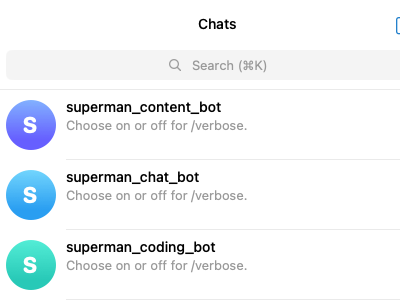
以下是我配置了不同 Agent 角色的 Telegram Bot:
技能系统
什么是技能?
技能是 OpenClaw 的插件系统,使 AI 能够:
- 访问外部 API(天气、新闻、股票)
- 操作本地资源(文件、摄像头)
- 执行特定任务(GitHub、日历、邮件)
安装技能
1
2
3
4
5
6
7
8
9
10
11
|
openclaw skill install <skill-slug>
openclaw skill search <keyword>
openclaw skill list
openclaw skill update
|
热门技能
| 技能 |
功能 |
安装命令 |
| weather |
天气预报 |
openclaw skills install weather |
| github |
GitHub 操作 |
openclaw skills install github |
| news-aggregator |
新闻聚合 |
npx skills add https://github.com/BODYsuperman/world-news-aggregator-skill |
| pinchtab-browser |
浏览器自动化 |
openclaw skills install pinchtab-browser |
创建自定义技能
1
2
3
4
5
6
7
8
9
10
11
12
13
|
mkdir -p ~/.openclaw/workspace-main/skills/my-skill
cat > ~/.openclaw/workspace-main/skills/my-skill/SKILL.md << 'EOF'
My custom skill
/MyCommand [arguments]
EOF
|
记忆系统
记忆类型
| 类型 |
文件 |
说明 |
| 长期记忆 |
MEMORY.md |
精选的重要信息 |
| 每日记忆 |
memory/YYYY-MM-DD.md |
原始日志 |
| 身份设定 |
IDENTITY.md |
AI 人格设置 |
| 用户信息 |
USER.md |
用户信息 |
| 行为准则 |
SOUL.md |
行为指南 |
记忆文件位置
1
2
3
4
5
6
7
8
9
10
11
| ~/.openclaw/workspace-main/
├── MEMORY.md # Long-term memory
├── IDENTITY.md # Identity settings
├── USER.md # User information
├── SOUL.md # Behavioral guidelines
├── AGENTS.md # Workspace description
├── TOOLS.md # Tool notes
├── HEARTBEAT.md # Heartbeat tasks
└── memory/
├── 2026-03-16.md # Daily memory
└── 2026-03-15.md
|
搜索记忆
1
2
3
4
5
|
openclaw memory search "project mentioned last time"
openclaw memory search --date 2026-03-15 "meeting"
|
记忆维护
建议定期(每周)审查 MEMORY.md:
- 删除过时信息
- 添加新的决策和上下文
- 整理每日记忆文件中的要点
定时任务
Cron 基础
1
2
3
4
5
6
7
8
9
10
11
|
openclaw cron add --schedule "0 9 * * *" --message "Good morning! Today's tasks:"
openclaw cron list
openclaw cron run <job-id>
openclaw cron remove <job-id>
|
Cron 表达式
| 表达式 |
说明 |
0 9 * * * |
每天 9:00 |
0 9 * * 1 |
每周一 9:00 |
*/30 * * * * |
每 30 分钟 |
0 0 1 * * |
每月 1 日 0:00 |
心跳任务
编辑 HEARTBEAT.md:
1
2
3
4
5
6
| # HEARTBEAT.md
- [ ] Check unread emails
- [ ] View calendar (within 24 hours)
- [ ] Check weather (if going out)
- [ ] Review memory files (weekly)
|
实用 Cron 示例
每日新闻简报:
1
2
3
4
| openclaw cron add \
--name "daily-news" \
--schedule "0 8 * * *" \
--message "Execute news-aggregator skill, send daily news"
|
每周备份:
1
2
3
4
| openclaw cron add \
--name "weekly-backup" \
--schedule "0 2 * * 0" \
--message "Backup workspace and memory directories"
|
常用命令
网关管理
1
2
3
4
5
6
| openclaw gateway start
openclaw gateway stop
openclaw gateway restart
openclaw gateway status
openclaw gateway install
openclaw gateway uninstall
|
配置管理
1
2
3
4
5
6
| openclaw onboard
openclaw configure
openclaw doctor
openclaw status
openclaw dashboard
openclaw tui
|
模型管理
1
2
3
| openclaw models status
openclaw models list
openclaw models add
|
渠道管理
1
2
3
| openclaw channels list
openclaw channels add
openclaw channels remove
|
Agent 管理
1
2
3
4
5
6
| openclaw agents list
openclaw agents create <name>
openclaw agents config <name>
openclaw agents start <name>
openclaw agents stop <name>
openclaw agents delete <name>
|
记忆操作
1
2
3
| openclaw memory search <query>
openclaw memory list
openclaw memory edit
|
会话管理
1
2
3
| openclaw sessions list
openclaw sessions history <key>
openclaw sessions send
|
故障排除
常见问题
问题 1:openclaw: command not found
1
2
3
4
5
6
7
8
9
|
npm prefix -g
export PATH="$(npm prefix -g)/bin:$PATH"
echo 'export PATH="$(npm prefix -g)/bin:$PATH"' >> ~/.bashrc
source ~/.bashrc
|
问题 2:网关启动失败
1
2
3
4
5
6
7
8
|
lsof -i :18789
journalctl --user -u openclaw-gateway.service -n 50
systemctl --user restart openclaw-gateway.service
|
问题 3:收不到 Telegram 消息
1
2
3
4
5
6
7
8
|
cat ~/.openclaw/openclaw.json | grep botToken
cat ~/.openclaw/telegram/update-offset-*.json
journalctl -t gateway-start.sh -n 30 | grep telegram
|
问题 4:模型 API 调用失败
1
2
3
4
5
6
7
8
9
|
openclaw models status
curl -H "Authorization: Bearer YOUR_API_KEY" \
https://api.example.com/v1/models
ping api.example.com
|
查看日志
1
2
3
4
5
6
7
8
9
|
journalctl --user -u openclaw-gateway.service -f
journalctl --user -u openclaw-gateway.service -n 50
journalctl --user -u openclaw-gateway.service \
--since "2026-03-16 10:00:00" --until "2026-03-16 12:00:00"
|
诊断命令
1
2
3
4
5
6
7
8
|
openclaw doctor
openclaw status
openclaw config list
|
11.4 重置与恢复
1
2
3
4
5
6
7
8
9
10
|
openclaw onboard --reset
openclaw gateway uninstall
openclaw gateway install
rm -rf ~/.openclaw/browser
rm -rf ~/.openclaw/cron
|
附录
A. 资源链接
B. 版本信息
- 文档版本:v1.1
- 适用 OpenClaw 版本:v2026.3.11+
- 最后更新:2026-03-17
C. 贡献者
本文档整合了以下内容来源:
- OpenClaw 橙皮书(华书)
- Datawhale OpenClaw 教程
- APIFox OpenClaw 使用指南
- OpenClaw 官方文档
如有疑问或建议,请向 OpenClaw 社区提供反馈。