0%

LangChain4J 实战:构建医疗 AI 助手 Agent


1. 什么是 LangChain4J?

1.1 LangChain4J 解决的问题

构建 AI 应用不仅仅是调用 LLM API。你还需要:

  • 管理对话上下文(聊天记忆)
  • 连接外部数据源(RAG)
  • 执行业务逻辑(函数调用)
  • 处理不同的 LLM 提供商

LangChain4J 是一个 Java 库,简化了将大语言模型(LLM)集成到 Java 应用中的过程。它提供:

功能 用途
统一 API 在 OpenAI、DeepSeek、Qwen 之间切换无需改代码
聊天记忆 在多轮对话中维持上下文
Function Calling 让 LLM 调用你的 Java 方法
RAG 将 LLM 连接到你的知识库
Spring Boot 集成 自动配置和依赖注入

1.2 核心概念

1
2
3
4
5
User Input → AIService → LLM → Response
↓
[Chat Memory]
[Tools/Functions]
[Knowledge Base]

关键组件:

  • ChatModel:与 LLM 提供商(OpenAI、DeepSeek 等)的接口
  • AIService:编排各组件的高层抽象
  • ChatMemory:存储对话历史
  • Tools:LLM 可以调用的 Java 方法
  • ContentRetriever:为 RAG 获取相关文档

2. 项目搭建

2.1 依赖

创建一个包含以下依赖的 Spring Boot 项目:

1
2
3
4
5
6
7
8
9
10
11
12
13
14
15
16
17
18
19
20
21
22
23
24
25
26
27
28
29
30
31
32
33
34
35
36
37
38
39
40
41
42
43
<properties>
<java.version>17</java.version>
<spring-boot.version>3.2.6</spring-boot.version>
<langchain4j.version>1.0.0-beta3</langchain4j.version>
</properties>

<dependencies>
<!-- Spring Boot Web -->
<dependency>
<groupId>org.springframework.boot</groupId>
<artifactId>spring-boot-starter-web</artifactId>
</dependency>

<!-- LangChain4J OpenAI (supports OpenAI, DeepSeek, etc.) -->
<dependency>
<groupId>dev.langchain4j</groupId>
<artifactId>langchain4j-open-ai-spring-boot-starter</artifactId>
</dependency>

<!-- LangChain4J Core -->
<dependency>
<groupId>dev.langchain4j</groupId>
<artifactId>langchain4j-spring-boot-starter</artifactId>
</dependency>

<!-- For RAG -->
<dependency>
<groupId>dev.langchain4j</groupId>
<artifactId>langchain4j-easy-rag</artifactId>
</dependency>
</dependencies>

<dependencyManagement>
<dependencies>
<dependency>
<groupId>dev.langchain4j</groupId>
<artifactId>langchain4j-bom</artifactId>
<version>${langchain4j.version}</version>
<type>pom</type>
<scope>import</scope>
</dependency>
</dependencies>
</dependencyManagement>

2.2 配置

application.properties:

1
2
3
4
5
6
7
8
9
10
11
# Server
server.port=8080

# OpenAI / DeepSeek Configuration
langchain4j.open-ai.chat-model.base-url=https://api.deepseek.com
langchain4j.open-ai.chat-model.api-key=${DEEP_SEEK_API_KEY}
langchain4j.open-ai.chat-model.model-name=deepseek-chat

# Logging
langchain4j.open-ai.chat-model.log-requests=true
langchain4j.open-ai.chat-model.log-responses=true

注意: 将 API 密钥存储在环境变量中,绝不要写在代码里。


3. 你的第一个 LLM 集成

3.1 直接 API 调用

直接测试连接:

1
2
3
4
5
6
7
8
9
10
11
12
13
14
15
@SpringBootTest
public class LLMTest {

@Test
public void testDirectCall() {
// Build model manually
OpenAiChatModel model = OpenAiChatModel.builder()
.apiKey("demo") // Use demo key for testing
.modelName("gpt-4o-mini")
.build();

String answer = model.chat("Hello, what is LangChain4J?");
System.out.println(answer);
}
}

3.2 Spring Boot 自动配置

使用 Spring Boot starter 后,模型会自动配置:

1
2
3
4
5
6
7
8
9
10
11
12
@SpringBootTest
public class LLMTest {

@Autowired
private OpenAiChatModel chatModel;

@Test
public void testAutoConfig() {
String answer = chatModel.chat("Explain RAG in simple terms");
System.out.println(answer);
}
}

4. 构建 AI 服务

4.1 助手接口

LangChain4J 使用接口和动态代理。定义你的 AI 能做什么:

1
2
3
4
5
6
7
8
9
10
11
12
13
package com.example.assistant;

import dev.langchain4j.service.spring.AiService;
import static dev.langchain4j.service.spring.AiServiceWiringMode.EXPLICIT;

@AiService(
wiringMode = EXPLICIT,
chatModel = "openAiChatModel"
)
public interface MedicalAssistant {

String chat(String userMessage);
}

工作原理:

  1. 定义包含方法的接口
  2. 使用 @AiService 注解
  3. LangChain4J 创建代理实现
  4. 代理处理输入/输出转换

4.2 系统消息

使用 @SystemMessage 定义 AI 的角色:

1
2
3
4
5
6
7
8
9
10
11
12
13
14
15
16
17
18
19
public interface MedicalAssistant {

@SystemMessage("""
You are "MediBot", an AI medical assistant for Peking Union Medical College Hospital.

Your responsibilities:
1. Provide general medical information and guidance
2. Help patients understand symptoms and treatment options
3. Assist with appointment scheduling when asked
4. Answer questions about hospital departments and doctors

Rules:
- Always be polite and professional
- Include appropriate medical disclaimers
- Never provide definitive diagnoses
- Recommend seeing a doctor for serious concerns
""")
String chat(String userMessage);
}

系统消息在开始时发送一次,用于设定 AI 的行为上下文。


5. 添加聊天记忆

5.1 为什么记忆很重要

没有记忆,每条消息都是独立的:

1
2
3
4
5
User: My name is John
AI: Nice to meet you, John!

User: What's my name?
AI: I don't know your name. ← Problem!

5.2 实现记忆

1
2
3
4
5
6
7
8
9
10
@AiService(
wiringMode = EXPLICIT,
chatModel = "openAiChatModel",
chatMemory = "chatMemory" // Reference to ChatMemory bean
)
public interface MedicalAssistant {

@SystemMessage("You are a helpful medical assistant.")
String chat(String userMessage);
}

配置:

1
2
3
4
5
6
7
8
9
@Configuration
public class AssistantConfig {

@Bean
ChatMemory chatMemory() {
// Keep last 10 messages
return MessageWindowChatMemory.withMaxMessages(10);
}
}

5.3 记忆隔离

在多用户场景下,通过 memoryId 隔离对话:

1
2
3
4
5
6
7
8
9
10
11
12
13
@AiService(
wiringMode = EXPLICIT,
chatModel = "openAiChatModel",
chatMemoryProvider = "chatMemoryProvider"
)
public interface MedicalAssistant {

@SystemMessage("You are a helpful medical assistant.")
String chat(
@MemoryId Long conversationId, // Unique per conversation
@UserMessage String message
);
}

配置:

1
2
3
4
5
6
7
@Bean
ChatMemoryProvider chatMemoryProvider() {
return memoryId -> MessageWindowChatMemory.builder()
.id(memoryId)
.maxMessages(10)
.build();
}

5.4 使用 MongoDB 持久化存储

将对话存储到 MongoDB:

1
2
3
4
5
6
7
8
9
10
11
12
13
14
15
16
17
18
19
20
21
22
23
24
25
@Component
public class MongoChatMemoryStore implements ChatMemoryStore {

@Autowired
private MongoTemplate mongoTemplate;

@Override
public List<ChatMessage> getMessages(Object memoryId) {
ChatMessages stored = mongoTemplate.findOne(
Query.query(Criteria.where("memoryId").is(memoryId)),
ChatMessages.class
);
return stored == null
? new ArrayList<>()
: ChatMessageDeserializer.messagesFromJson(stored.getContent());
}

@Override
public void updateMessages(Object memoryId, List<ChatMessage> messages) {
Query query = Query.query(Criteria.where("memoryId").is(memoryId));
Update update = new Update().set("content",
ChatMessageSerializer.messagesToJson(messages));
mongoTemplate.upsert(query, update, ChatMessages.class);
}
}

更新配置:

1
2
3
4
5
6
7
8
@Bean
ChatMemoryProvider chatMemoryProvider(MongoChatMemoryStore store) {
return memoryId -> MessageWindowChatMemory.builder()
.id(memoryId)
.maxMessages(20)
.chatMemoryStore(store) // Persistent storage
.build();
}

6. Function Calling(函数调用)

6.1 什么是 Function Calling?

Function Calling 允许 LLM 调用你的 Java 方法。LLM 会:

  1. 分析用户的请求
  2. 判断是否需要使用工具
  3. 提取参数
  4. 调用你的方法
  5. 在回复中使用返回结果
1
2
3
4
5
6
User: Book an appointment with Dr. Wang tomorrow at 2pm

LLM → Detects "book appointment" intent
→ Calls bookAppointment(doctor="Dr. Wang", date="2025-06-12", time="14:00")
← Returns "Appointment confirmed"
→ Responds: "Your appointment with Dr. Wang is confirmed for tomorrow at 2pm."

6.2 创建工具

使用 @Tool 注解方法:

1
2
3
4
5
6
7
8
9
10
11
12
13
14
15
@Component
public class CalculatorTools {

@Tool(name = "sum", value = "Add two numbers")
public double sum(
@P(value = "First number") double a,
@P(value = "Second number") double b) {
return a + b;
}

@Tool(name = "squareRoot", value = "Calculate square root")
public double squareRoot(@P(value = "Number") double x) {
return Math.sqrt(x);
}
}

在 AIService 中注册工具:

1
2
3
4
5
6
7
8
9
@AiService(
wiringMode = EXPLICIT,
chatModel = "openAiChatModel",
chatMemoryProvider = "chatMemoryProvider",
tools = "calculatorTools" // Tool bean name
)
public interface MedicalAssistant {
String chat(@MemoryId Long id, @UserMessage String message);
}

6.3 预约挂号工具

医疗预约的实际示例:

1
2
3
4
5
6
7
8
9
10
11
12
13
14
15
16
17
18
19
20
21
22
23
24
25
26
27
28
29
30
31
32
33
34
35
36
37
38
39
40
41
42
43
44
45
46
47
48
49
50
51
@Component
public class AppointmentTools {

@Autowired
private AppointmentService appointmentService;

@Tool(name = "checkAvailability",
value = "Check if a doctor has available slots")
public boolean checkAvailability(
@P(value = "Department name") String department,
@P(value = "Date in YYYY-MM-DD format") String date,
@P(value = "Time slot: morning or afternoon") String time,
@P(value = "Doctor name (optional)", required = false) String doctorName) {

return appointmentService.hasAvailability(department, date, time, doctorName);
}

@Tool(name = "bookAppointment",
value = "Book a medical appointment. Confirm details with user first.")
public String bookAppointment(
@P(value = "Patient name") String patientName,
@P(value = "Patient ID card number") String idCard,
@P(value = "Department") String department,
@P(value = "Date in YYYY-MM-DD") String date,
@P(value = "Time: morning or afternoon") String time,
@P(value = "Doctor name (optional)", required = false) String doctorName) {

Appointment appointment = new Appointment();
appointment.setPatientName(patientName);
appointment.setIdCard(idCard);
appointment.setDepartment(department);
appointment.setDate(date);
appointment.setTime(time);
appointment.setDoctorName(doctorName);

boolean success = appointmentService.save(appointment);
return success ? "Appointment booked successfully" : "Failed to book appointment";
}

@Tool(name = "cancelAppointment",
value = "Cancel an existing appointment")
public String cancelAppointment(
@P(value = "Patient name") String patientName,
@P(value = "ID card number") String idCard,
@P(value = "Department") String department,
@P(value = "Date in YYYY-MM-DD") String date) {

boolean success = appointmentService.cancel(patientName, idCard, department, date);
return success ? "Appointment cancelled successfully" : "No matching appointment found";
}
}

7. RAG - 检索增强生成

7.1 为什么需要 RAG?

pic
LLM 有知识截止日期。它们不知道:

  • 你医院的具体科室
  • 医生的排班和专长
  • 最新的医院政策
  • 内部流程

RAG 检索相关文档并将其作为上下文提供:

方案 优点 缺点
微调 推理速度快,准确率高 成本高,更新慢,需要专业知识
RAG 易于更新,性价比高,无需训练 需要两次查询(检索 + 生成)

7.2 向量搜索详解

向量是文本的数值表示。相似的文本有相似的向量。

1
2
3
"Cardiology department"  → [0.1, 0.3, -0.2, ...] (1024 dimensions)
"Heart specialist" → [0.12, 0.28, -0.19, ...] (similar vector)
"Dentistry" → [-0.5, 0.1, 0.8, ...] (different vector)

相似度计算:

  • 余弦相似度:衡量向量之间的夹角
  • 欧氏距离:衡量直线距离

相似度越高 = 内容越相关。

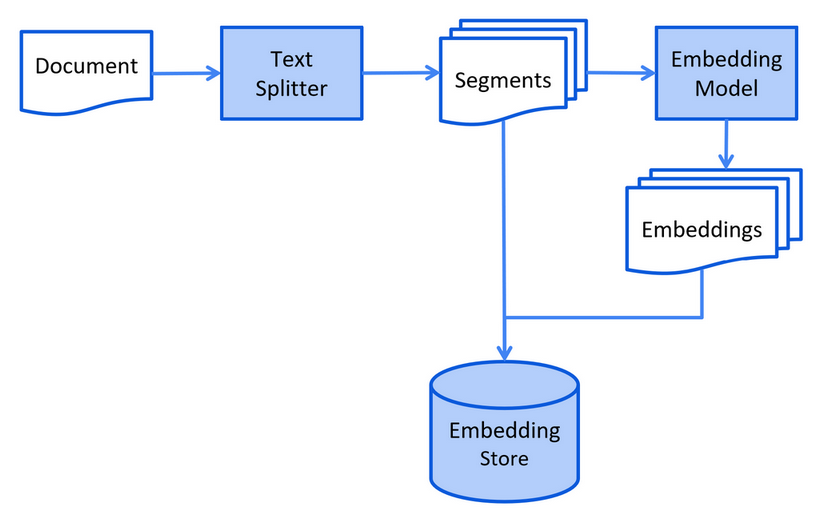
7.3 文档处理流水线

1
2
Document → Parse → Split → Embed → Store
(PDF/MD) (Chunks) (Vectors) (Vector DB)

为什么要拆分文档?

  • LLM 上下文窗口有限
  • 更小的分块 = 更精确的检索
  • 减少无关内容的噪声

7.4 实现 RAG

第一步:加载和处理文档

1
2
3
4
5
// Load hospital information documents
Document hospitalDoc = FileSystemDocumentLoader.loadDocument(
"knowledge/hospital-info.md");
Document deptDoc = FileSystemDocumentLoader.loadDocument(
"knowledge/departments.md");

第二步:创建向量存储

1
2
3
4
5
6
7
8
9
10
11
12
13
14
15
16
17
18
@Bean
ContentRetriever contentRetriever(EmbeddingModel embeddingModel) {
// Load documents
List<Document> documents = Arrays.asList(
FileSystemDocumentLoader.loadDocument("knowledge/hospital-info.md"),
FileSystemDocumentLoader.loadDocument("knowledge/departments.md"),
FileSystemDocumentLoader.loadDocument("knowledge/doctors.md")
);

// In-memory store (use Pinecone/Milvus for production)
InMemoryEmbeddingStore<TextSegment> store = new InMemoryEmbeddingStore<>();

// Process and store
EmbeddingStoreIngestor.ingest(documents, store);

// Create retriever
return EmbeddingStoreContentRetriever.from(store);
}

第三步:配置带 RAG 的 AIService

1
2
3
4
5
6
7
8
9
10
11
12
@AiService(
wiringMode = EXPLICIT,
chatModel = "openAiChatModel",
chatMemoryProvider = "chatMemoryProvider",
tools = "appointmentTools",
contentRetriever = "contentRetriever" // RAG component
)
public interface MedicalAssistant {

@SystemMessage(fromResource = "medical-assistant-prompt.txt")
String chat(@MemoryId Long id, @UserMessage String message);
}

生产环境向量数据库 - Pinecone:

1
2
3
4
5
6
7
8
9
10
11
12
13
@Bean
EmbeddingStore<TextSegment> embeddingStore(EmbeddingModel model) {
return PineconeEmbeddingStore.builder()
.apiKey(System.getenv("PINECONE_API_KEY"))
.index("medical-kb")
.nameSpace("hospital-info")
.createIndex(PineconeServerlessIndexConfig.builder()
.cloud("AWS")
.region("us-east-1")
.dimension(model.dimension()) // 1024 for text-embedding-v3
.build())
.build();
}

8. 整合所有组件

8.1 完整的 Agent 配置

MedicalAssistant.java:

1
2
3
4
5
6
7
8
9
10
11
12
13
14
15
16
17
18
19
20
21
package com.example.assistant;

import dev.langchain4j.service.*;
import dev.langchain4j.service.spring.AiService;
import static dev.langchain4j.service.spring.AiServiceWiringMode.EXPLICIT;

@AiService(
wiringMode = EXPLICIT,
chatModel = "openAiChatModel",
chatMemoryProvider = "chatMemoryProvider",
tools = "appointmentTools",
contentRetriever = "contentRetriever"
)
public interface MedicalAssistant {

@SystemMessage(fromResource = "medical-assistant-prompt.txt")
String chat(
@MemoryId Long conversationId,
@UserMessage String userMessage
);
}

medical-assistant-prompt.txt:

1
2
3
4
5
6
7
8
9
10
11
12
13
14
15
16
You are "MediBot", an AI assistant for Peking Union Medical College Hospital.

Your capabilities:
1. Medical consultation - provide general health information
2. Department guidance - help patients find the right department
3. Doctor information - answer questions about our doctors
4. Appointment management - book and cancel appointments

Rules:
- Always verify patient identity (name + ID card) before appointments
- Confirm appointment details before booking
- Use the knowledge base for hospital-specific information
- Be professional yet friendly
- Add appropriate emoji to make responses warm

Today is {{current_date}}.

8.2 控制器层

1
2
3
4
5
6
7
8
9
10
11
12
13
14
15
16
17
18
19
20
@RestController
@RequestMapping("/api/medical")
@Tag(name = "Medical AI Assistant")
public class MedicalController {

@Autowired
private MedicalAssistant assistant;

@PostMapping("/chat")
@Operation(summary = "Chat with medical assistant")
public String chat(@RequestBody ChatRequest request) {
return assistant.chat(request.getConversationId(), request.getMessage());
}
}

@Data
public class ChatRequest {
private Long conversationId; // Unique per user session
private String message;
}

9. 最佳实践

系统设计

实践 重要性
多用户使用 @MemoryId 防止用户之间的对话串扰
持久化聊天记忆 服务器重启不丢失上下文
工具描述 清晰的描述帮助 LLM 正确选择
文档分块 更小的分块提高检索精度
最低分数阈值 过滤低相关性结果

安全

1
2
# Never commit API keys
langchain4j.open-ai.chat-model.api-key=${OPENAI_API_KEY}

性能

1
2
3
4
5
6
7
8
// Limit chat memory to control token usage
MessageWindowChatMemory.withMaxMessages(10)

// Set minScore to filter irrelevant documents
EmbeddingStoreContentRetriever.builder()
.minScore(0.8)
.maxResults(3)
.build()

常见陷阱

陷阱 解决方案
LLM 不使用工具 改进工具描述
工具参数错误 使用 @P 注解并配以清晰的描述
超出范围的回复 优化系统消息
响应缓慢 使用流式输出实现实时反馈

10. 常见问题

Q:能否在不改代码的情况下从 OpenAI 切换到 DeepSeek?

A:可以。只需修改配置:

1
2
3
4
5
6
7
# From OpenAI
langchain4j.open-ai.chat-model.base-url=https://api.openai.com/v1
langchain4j.open-ai.chat-model.api-key=${OPENAI_KEY}

# To DeepSeek
langchain4j.open-ai.chat-model.base-url=https://api.deepseek.com
langchain4j.open-ai.chat-model.api-key=${DEEPSEEK_KEY}

Q:如何处理敏感的医疗数据?

A:

  • 通过 Ollama 使用本地 LLM 处理敏感数据
  • 在发送到外部 API 之前实施数据脱敏
  • 加密存储聊天记录
  • 遵循 HIPAA/GDPR 合规要求

Q:ChatMemory 和 ChatMemoryProvider 有什么区别?

A:

  • ChatMemory:单个共享的记忆实例
  • ChatMemoryProvider:工厂模式,为每个 memoryId 创建隔离的记忆

Q:如何更新知识库?

A:只需添加新文档并重新导入:

1
2
3
4
5
// New document
Document newDoc = FileSystemDocumentLoader.loadDocument("new-policy.md");

// Add to existing store
EmbeddingStoreIngestor.ingest(newDoc, embeddingStore);

Q:LLM 能在一次对话中调用多个工具吗?

A:可以。LLM 可以链式调用工具:

1
2
3
4
5
User: "Book Dr. Wang and check if Dr. Li is available next week"

LLM → Calls bookAppointment(...)
→ Calls checkAvailability(...)
→ Responds with both results
11. 总结

我们使用 LangChain4J 构建了一个医疗 AI 助手,包含:

  1. Spring Boot 集成 - 自动配置和依赖注入
  2. LLM 集成 - 面向 OpenAI、DeepSeek 等的统一 API
  3. 聊天记忆 - 持久化的对话上下文
  4. Function Calling - LLM 可调用的 Java 方法
  5. RAG - 从文档中检索知识

核心收获:

  • LangChain4J 通过简洁的接口抽象了 LLM 的复杂性
  • AIService 模式保持代码整洁且可测试
  • 聊天记忆使自然的多轮对话成为可能
  • Function Calling 将 LLM 推理与业务逻辑桥接
  • RAG 将 LLM 锚定在你特定的领域知识上

下一步:

  • 添加流式响应以提升用户体验
  • 实现多模态支持(图片)
  • 添加评估框架以衡量回复质量
  • 使用 Docker 和 Kubernetes 部署

项目链接:

SmartMed-LangChain4j-RAG
如果你觉得这个仓库有用,请给个 star。⭐⭐⭐

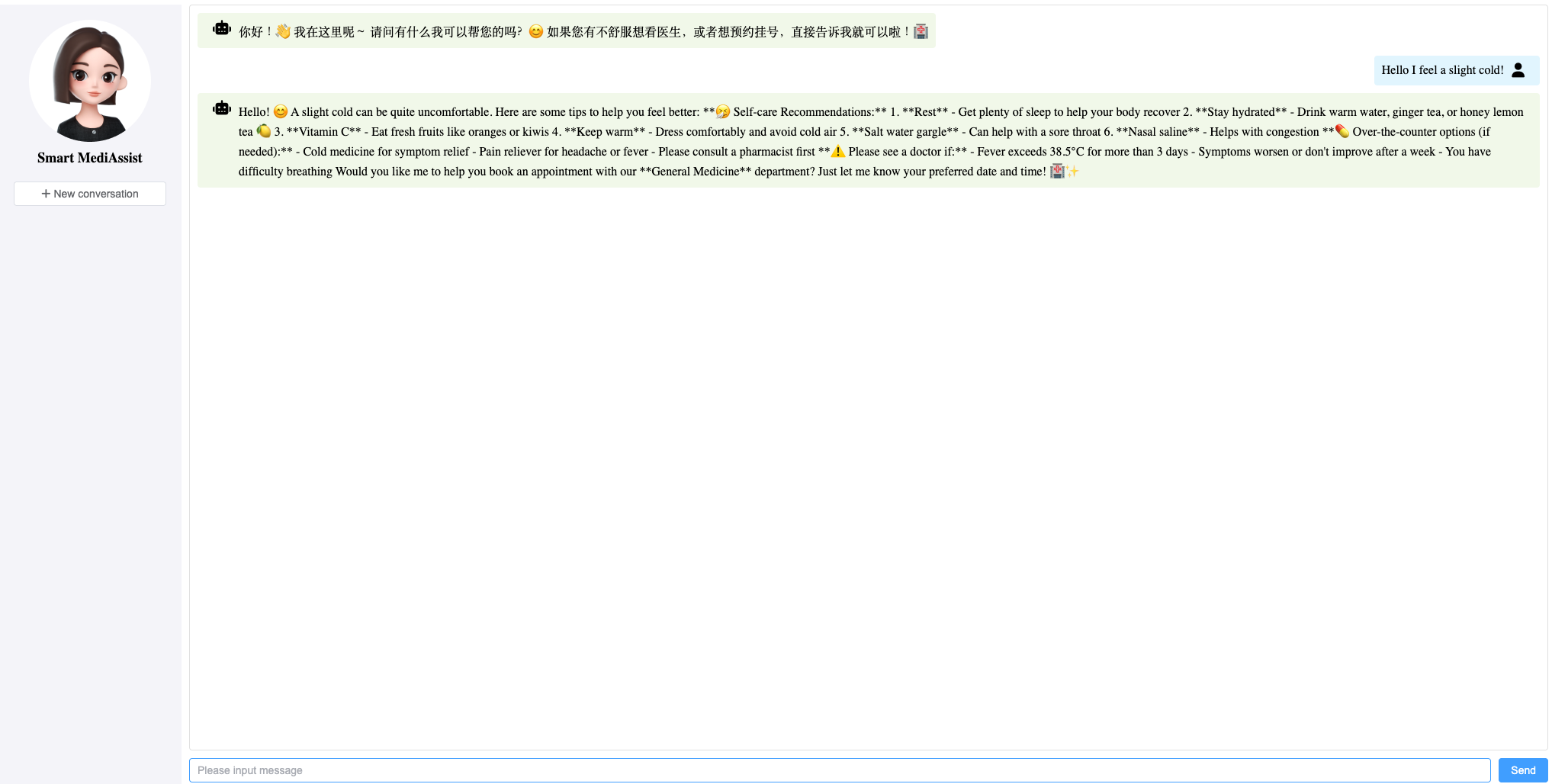
演示:

pic

参考文献

Author: Alex

Article Link: https://bodysuperman.github.io/zh-CN/2026/04/27/LangChain4J-in-Action-Building-a-Medical-AI-Assistant-Agent/

License: This article is licensed under CC BY-NC-SA 4.0. Please credit the original author and include the source link when reposting.